
- Published
- Oct 28, 2026
- Reading time
- 12 min read
Email Clicks vs GA4 Sessions: Investigate Bots Without Guessing
Email clicks and GA4 sessions disagree? Separate unique recipients, security scans, tag execution and attribution with a practical evidence-first workflow.
In this guide (11 sections)
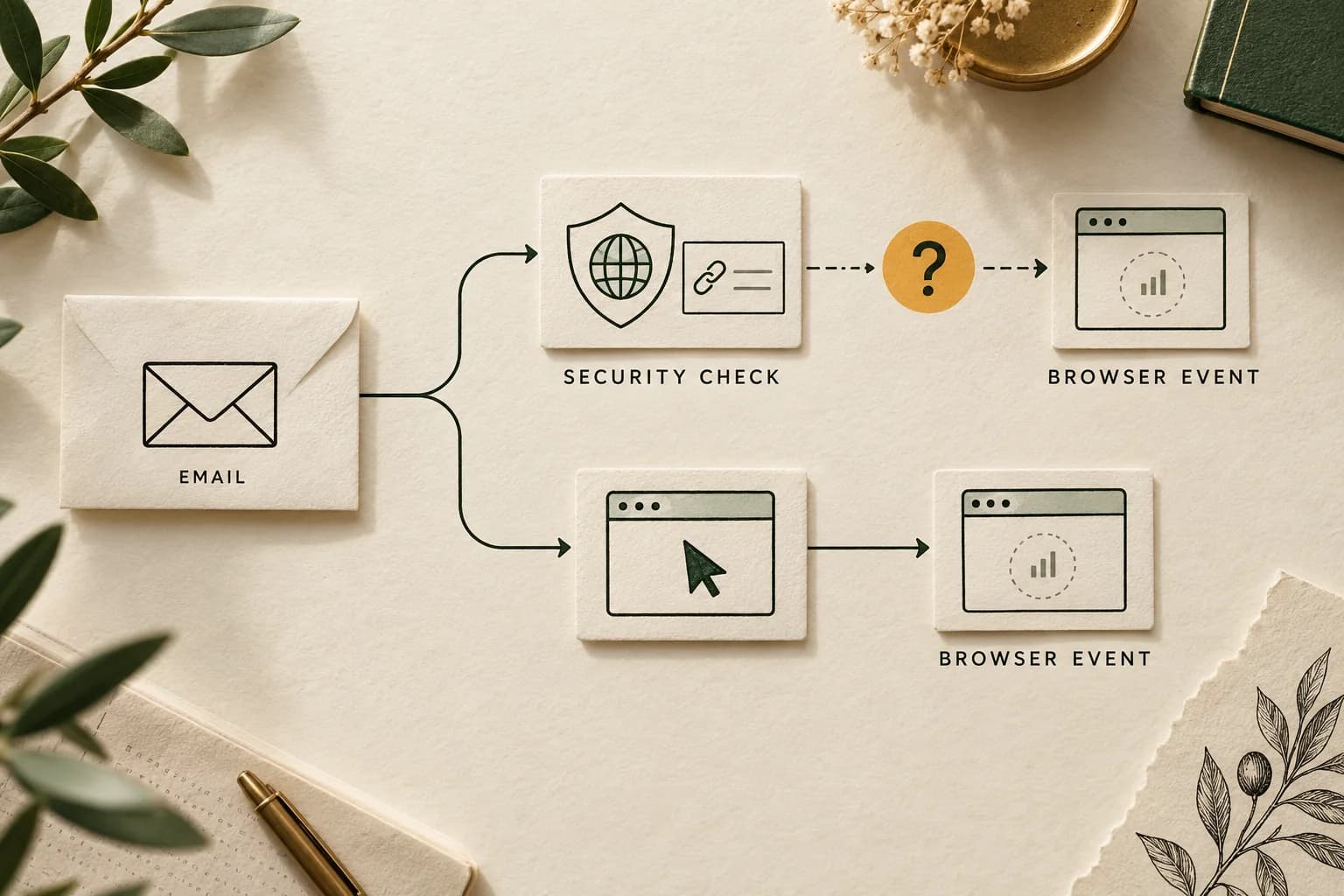
Email sessions exceeding email clicks do not, by themselves, prove bots. Email clicks exceeding sessions do not prove broken tracking either. First identify what each report counts, then trace the email redirect, website request and Analytics collection separately. Security inspection is a credible hypothesis, but an automated request for a link is not automatically a measured GA4 session.
Keep unique recipients, repeated click activities, sessions and business outcomes in separate columns. Then use a controlled mailbox test, source logs and the actual filtering settings to identify which part of the difference is explained. Preserve an unknown category where the evidence stops.
A real question, with an unresolved cause#
A public Marketo and GA4 discussion asks why email sessions surged and exceeded email clicks without a known database change. Replies suggest security scanners, copied campaign links and filtering differences. The author adds that many visits appear associated with a data-center location.
The question was posted on 15 October 2026 UTC. A 22 October UTC reply adds a technical explanation to evaluate; a 26 October UTC reply asks whether others see the pattern. These are different kinds of activity, and neither establishes a resolution.
Those details establish a useful investigation, not its answer. A network location does not identify the actor, and low engagement does not establish automation. The discussion contains confident explanations without a controlled test or a verified resolution.
An independent email measurement question reports the opposite pattern: email clicks substantially exceed GA4 sessions. Both patterns need the same boundary checks. Do not assume the same security product, filtering policy or analytics implementation applies to every sender and recipient.
Trace the email click to the analytics session
Clicks and sessions count different events; neither gap alone proves bots or broken tracking. Discuss what the event trail can establish.
Discuss measurement optionsA short inquiry to scope relevant options; no campaign access is needed.
1. Name the email click metric precisely#
“Clicks” can mean recipients, people per link or repeated activities. Record the product, report, column and uniqueness rule before calculating a ratio.
Adobe's Marketo Email Performance reference defines Clicked Link as recipients who clicked a link in the email. Its Email Link Performance reference separately describes Clicks as the number of clicks and People as unique people who clicked a link. Summing per-link unique people can count the same recipient on several links.
| Observation | Unit to preserve | What it does not establish |
|---|---|---|
| Email recipient click metric | People under that report's deduplication rule | Total website visits or unique humans |
| Link click activities | Recorded interactions with a tracked link | Successful landing-page rendering |
| Redirect or web access log | Requests received at a particular endpoint | JavaScript execution or Analytics receipt |
| GA4 sessions | Sessions under the property's measurement rules | Email recipients, link clicks or verified humans |
| Accepted orders or qualified leads | Outcomes under the business's acceptance rule | Which channel caused them |
Check whether the exported report covers all links or only the website call to action. Also note report-specific exclusions. An unsubscribe, mailto link and product-page link need not belong in the same website-arrival comparison.
2. Save the filters and dates before changing anything#
Freeze a completed interval and retain the original reports. Record the send identifiers, included links, extraction time, account and property time zones, recipient exclusions, email bot settings and GA4 report filters.
Distinguish a report selecting messages by send date from one selecting click activities by activity date. The Email Performance documentation says its Sent Date filter uses the first send date. A later click on an older message can therefore fall into differently selected cohorts across reports.
Adobe's bot filtering documentation describes IAB-list matching and proximity-pattern matching, with choices to log or filter detected activity. Record the actual modes, duration setting and change dates. Filtering can reduce reported email opens and clicks without changing what the website receives.
That separation matters: an email platform can remove a classified activity from its reporting while another system still observes the destination request. This is a plausible mechanism to test, not proof that it explains a particular GA4 session surplus. Do not assume changing the email filter retroactively changes GA4.
3. Trace the path far enough to prove collection#
Draw the route from the message to the website. It might include a security wrapper, the sender's tracking redirect, another redirect and the final landing page. Inspect the delivered message's URL as well as the destination configured in the email editor.
Microsoft's Safe Links overview documents URL scanning and rewriting during mail flow and time-of-click checks. That establishes a legitimate security function. It does not establish that every protected link executes the destination's JavaScript or produces a GA4 session.
For each observed visit, distinguish:
- A request reached the tracking redirect.
- The redirect returned an appropriate destination.
- A request reached the intended website.
- The page and expected scripts executed under the relevant consent state.
- The expected Analytics destination received collection activity.
- The selected reporting surface exposed the expected measurement.
A server log can establish step three while leaving the later steps unobserved. A successful page response does not establish visible rendering. An outgoing analytics request is useful collection evidence, but still requires the correct destination, session context and receiving check.
The tracking QA checklist covers controlled execution and receiving-surface checks. Use the Google Ads click/session diagnostic for the shared redirect, consent and tag branches; keep its advertising click definitions separate from the email report's units.
4. Run an unopened-versus-clicked mailbox test#
Use authorized seed mailboxes and a non-sensitive test landing page. Coordinate with the people who administer the mailbox environment. Keep the security policy in place; record which policy applies rather than weakening it to improve marketing metrics.
Give each test message or mailbox cohort a distinct, non-personal campaign marker. Do not embed email addresses or personal identifiers in Analytics URLs. Keep any private mapping separate from the reporting parameters.
| Test phase | What to record | Useful finding |
|---|---|---|
| Before delivery | Baseline requests and collection for the test marker | Unexpected activity before the message exists |
| Delivered, untouched by the test user | Redirect and website requests, timestamps and available security logs | Access before a deliberate human click |
| Opened without deliberately clicking | Remote-content activity separately from destination visits | Whether opening correlates with another access path |
| One deliberate click | Actual redirects, consent state, tag execution and receiving diagnostics | The expected human path in this environment |
| Later deliberate return | Session context and campaign classification | Whether a new visit needs another recorded email click |
Record actual times, not just “immediately after send.” Repeat across relevant recipient environments if access permits. A result from one corporate mailbox does not identify what every customer mailbox does.
An unopened-message request strongly supports background access in that controlled test. Identifying the responsible security service still benefits from administrator logs or another corroborating signal. To connect background access to GA4, inspect the collection and receiving evidence for the same test marker. If only the web request is observable, stop at that boundary.
5. Read GA4's session and attribution rules correctly#
Google's session reference explains that a page or screen view can begin a session when none is active; the default inactivity timeout is 30 minutes and is configurable. Multiple link clicks during an active session do not require multiple new sessions. A later return can produce another session without another email click during the report interval.
Use session-scoped source/medium and campaign dimensions for a session comparison. Google's traffic-source scope guide distinguishes these from first-user and event-scoped attribution. Do not compare a First user email audience with every session from the current campaign.
Inspect the actual source/medium values and landing-page campaign information, rather than relying only on a channel label. Session classification is not a statement that a recipient clicked a particular message at that instant. Google documents non-direct last-click session attribution; a later direct return can retain credit from an earlier non-direct source under the applicable settings.
Copied or forwarded tagged links can also carry campaign context beyond the original recipient. Inspect that possibility without assuming it occurred. The email platform's person-level identity and the website's browser/session identity are different systems; an aggregate ratio cannot reconstruct a one-to-one person journey.
6. Treat engagement and location as supporting evidence#
Google's engagement reference defines engaged sessions using duration, a key event or multiple page/screen views. This is a behavioral measurement, not a human-verification procedure. Check the property's configured timing and key-event definitions before using engagement as an investigation segment.
A real person can leave quickly after finding the wrong page. An automated environment can produce multiple page requests or trigger a poorly defined key event. Neither “not engaged” nor “engaged” is a reliable identity label by itself.
Similarly, a data-center-associated location, IP range or user-agent string is a lead requiring context. Shared routing, proxies, corporate gateways and automation can overlap. Corroborate timing, repeatability, request behavior and authorized security logs before assigning an explanation.
Google automatically excludes known bots and spiders, using Google research and the IAB list. Its documentation says the exclusion cannot be disabled and the excluded quantity is not exposed. That does not establish perfect detection of all automation, or provide a number to subtract from email clicks.
Apple Mail opens are a separate branch#
Apple's Mail Privacy Protection documentation says remote content can be downloaded privately in the background when a message is received. That affects how an image-based open should be interpreted.
An email's remote-image request is different from a link redirect or destination-page visit. Do not turn an open-rate explanation into proof that Apple created the GA4 sessions in question. Trace the destination and collection steps independently.
A worked example with an honest unknown bucket#
The following figures are hypothetical, not customer measurements or an industry benchmark. A team freezes one campaign's completed activity interval and records:
| Reported observation | Count |
|---|---|
| Unique email recipients with a reported click | 200 |
| Reported link-click activities | 300 |
| Requests to the selected redirect endpoint | 420 |
| GA4 sessions assigned to the selected email campaign | 280 |
| Engaged sessions within that GA4 population | 70 |
These rows are different units, not a single conserved funnel. Repeat requests, repeat visits, attribution and filtering can differ. The ratio 280 / 200 = 1.4 describes sessions per reported clicking recipient; it is not a bot rate. The engagement rate is 70 / 280 = 25%, which is not the human share.
The team investigates a deliberately selected, suspicious subset of 80 of those sessions. Corroborated collection and security evidence identifies 18 as automated accesses. Documented interaction supports a human explanation for 22. The remaining 40 are unresolved: 18 + 22 + 40 = 80.
The confirmed automated share inside the selected subset is 18 / 80 = 22.5%. Because the subset was selected for investigation rather than randomly sampled, do not apply that percentage to all 280 sessions. Do not classify the remaining 200 unreviewed sessions as human either.
If a later review changes classifications, preserve the rule, evidence and processing date. Reporting “18 corroborated automated sessions, 40 unresolved in the reviewed subset, 200 outside this review” is more useful than an unsupported campaign-wide bot percentage.
Change the reporting view before discarding data#
Start with reversible comparisons showing the original population, the investigated segments and unresolved records. Google's data-filter documentation warns that processing exclusions are permanent for affected incoming data and do not repair history. Report filtering is a different operation.
Do not install a broad location or network exclusion merely to make the totals agree. First test whether it would remove legitimate visits, whether the criterion identifies the intended population and which reporting periods become incomparable. Keep email engagement, measured website activity and accepted outcomes visible together; none substitutes for the others.
Our anonymized fashion-retail delivery-quality case demonstrates the value of a defined measurement baseline. Its evidence concerns advertising delivery, not email security or email-attributed sales.
For an accompanying paid-campaign delivery question, discuss the supported measurement scope with AdProof. Bring campaign identifiers, dates, event definitions and comparable exports. Supported delivery-event and report exports can help investigate that agreed scope. Confirm integration and coverage separately; an email security investigation still needs the sender, website and mailbox evidence described here.
Frequently asked questions#
Can a security scanner create a GA4 session?
It is possible when the relevant collection and session conditions are met. A security request for a link or HTML page alone does not establish that. Verify destination behavior and Analytics receipt in a controlled environment before attributing production sessions to a scanner.
Are sessions higher than unique email clicks necessarily wrong?
No. Recipient-level uniqueness, repeated visits, source attribution, filtering and period selection can differ. Align those definitions first, then investigate the remaining gap. There is no universal ordering or acceptable percentage established by the ratio alone.
Should I replace email Sessions with Engaged sessions?
Keep both with clear definitions. Engagement can help segment the investigation, but it does not identify humans or remove every automated visit. Validate key events and use accepted business outcomes alongside activity metrics.
Does GA4's known-bot exclusion make another investigation unnecessary?
No. Google describes exclusion of known bots, not a complete human-verification guarantee, and does not expose the excluded quantity. Preserve suspicious and unresolved segments, inspect collection paths and corroborate the cause before changing filters.
Trace the email click to the analytics session
Clicks and sessions count different events; neither gap alone proves bots or broken tracking. Discuss what the event trail can establish.
Discuss measurement optionsA short inquiry to scope relevant options; no campaign access is needed.