
- Published
- Nov 18, 2026
- Reading time
- 13 min read
Google Ads Counts a Purchase Twice Even With a Transaction ID: What to Check
Diagnose duplicate Google Ads purchase counts by separating repeated sends, conversion actions, reporting dates and transaction ID rules before changing tags or bidding.
In this guide (9 sections)
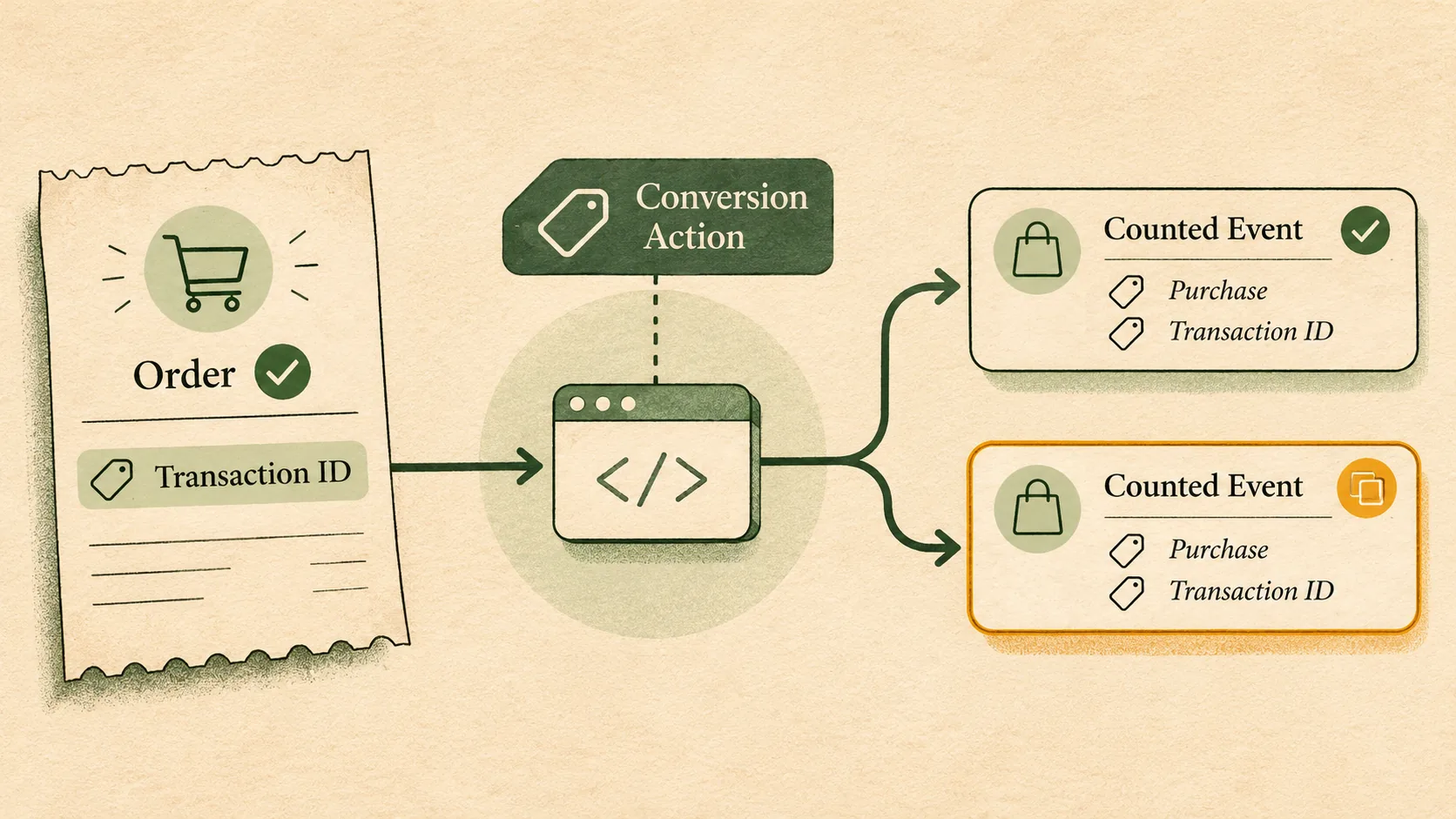
If Google Ads appears to count a purchase twice even though your tag sends an order ID, do not begin by changing bidding or switching purchase actions to Count: One. First find out whether you are looking at two separately configured conversion actions, two sends, one event represented in two report rows, or a report that changed as attribution data arrived. Then test the transaction ID within the exact conversion action that appears duplicated.
Google documents that two conversions with the same transaction ID for the same conversion action are treated as duplicates, and says the later duplicate is not counted. It also warns that reusing an ID across different orders can cause undercounting, and that Google Ads does not expose transaction IDs in its reports. That means the account UI cannot by itself prove which order IDs were counted twice. Preserve your own order-level evidence and escalate the precise discrepancy if the inputs and action match the documented rule.
A recent Google Ads advertiser question reported 17–20% of purchase-confirmation URLs with two conversions and twice the value, despite the poster's claim that an order ID was present. The poster's setup, counts and support history are self-reported; they do not establish a platform defect or explain the cause. A separate Search campaign question described an “x2” conversion-path row and later identified Add to Cart actions among the conversion totals. That is a useful reminder to inspect which action a row represents before calling it a duplicate purchase.
Start by defining what the “duplicate” means#
Use the same completed date range and write down the specific Google Ads surface, metric, segment and conversion action. “Two conversions on the same URL” does not necessarily mean one order was counted twice. A confirmation URL can receive visits for multiple orders, a path row can represent a sequence of interactions, and a report may show separate actions or credit under separate settings.
| Observation | What it can establish | What it cannot establish on its own |
|---|---|---|
| Two conversion actions show purchase volume | More than one action is contributing to the chosen report | That both actions represent the same order |
| One action has two conversion rows for a URL | The report associates two credits with that URL grouping | That the same transaction ID was sent twice |
| Two browser requests carry one order's event | The measured implementation sent two requests | That both requests were eligible or counted in Ads |
| Store order ledger has one order, Ads has two credits | The defined totals disagree | Whether the difference is collection, action setup, attribution, report timing or an invalid order definition |
| A path report contains “x2” | The chosen path dimension has a row labelled x2 | That it means two purchases; inspect the report's dimension and documentation |
Do not use a conversion path row as an order ledger. When the question is “How many orders were accepted?”, the store or commerce backend defines the business denominator under documented rules for payment, cancellation, test orders, refunds and time zone. Google Ads reports conversion credit under the selected actions and attribution/reporting definitions. Those are different populations and units.
Make the next tracking test reproducible.
Use the ungated QA checklist to record event rules, consent, duplicate sends and the report you expect to change.
Read the tracking QA checklistOpens a practical guide. No email required.
1. Check the conversion actions before the event tag#
Open Goals → Conversions → Summary and identify every action that could represent a purchase. Record each action's source, name, status, primary or secondary role, count setting and whether it is included in the campaign's goal. Use the conversion-action segment in the relevant report so the total is not hiding which actions supplied it.
A native Google Ads tag, a Google & YouTube channel integration and a GA4 import can each describe purchase activity. If two purchase actions are both included in the relevant campaign objective or reporting column, their totals can appear together. That is different from transaction-ID deduplication: Google's documented rule applies to repeated IDs for the same action. Do not assume an ID on one action deduplicates a second action with another source or name.
Also distinguish Conversions from All conversions, and inspect the selected goal and campaign-specific goal settings. A secondary action may still appear in “All conversions” even when it is not used for bidding in the same way as a primary action. Do not change primary status merely to make a total resemble the store ledger; write down what each report is counting first.
For the separate task of selecting which actions campaigns optimize toward, see campaign-specific Google Ads conversion goals.
A recent cross-channel ROAS question included a concern that Google Ads reported nearly as many conversions as total Shopify orders. The thread's replies recommended checking action duplication and conversion-time columns. These are hypotheses worth testing, not a conclusion about that account. See the existing Meta purchases versus Shopify orders reconciliation guide for the broader task of separating store orders, event receipt and attribution credit.
2. Verify the transaction ID at the actual send point#
Google requires a dynamically generated ID that is unique for each individual order, and it must not contain information that identifies the customer. A database order number can work when it is stable and unique for the business scope where the action receives data. “The field is populated” is not enough: confirm that it contains the expected order reference on the production confirmation journey and is not a static string, empty template token, URL, email, price or ID that repeats across stores.
For a GTM implementation, Google says to use a variable for the transaction ID rather than a fixed value. In Preview or Tag Assistant, complete an authorized test purchase and inspect the outgoing conversion request. Record the action destination/label and the transaction ID privately. Reloading the same test confirmation page should retain the same order ID; a second legitimate test order should have a different one. Use a test environment where possible and avoid creating paid clicks or artificial production conversions to force a report row.
Check each sender separately: Google tag, GTM, ecommerce app, checkout extension, custom script, server-side container, and any scheduled or offline upload. A GTM container being unique does not prove there is only one sender. Conversely, seeing two requests does not prove that two Ads conversions were counted. Compare the same action, ID, timestamp, value and currency across the sources you can inspect.
3. Test the documented deduplication scope#
Google's help describes duplicate handling within a single conversion action. For multi-source conversions, Google separately documents matching a website tag and an additional data source within the same action; this does not deduplicate against other conversion actions. Keep those scopes explicit when a browser tag and an upload both send the order.
Check whether IDs are globally unique across the reporting scope. For example, two country stores may each issue order 10482. If both send to the same conversion action, the same value can refer to different orders. Google warns that reuse across multiple orders can result in undercounting. A safe identifier should be unique to the conversion action's order universe, not merely unique inside one storefront, and should avoid customer-identifying information.
Do not infer that a payment redirect, cross-device attribution or consent mode caused a second event because duplicates appeared later. Those explanations have to be tested against the original order, tag request, action and reporting columns. The Reddit thread contains community theories about return journeys and cross-device attribution, but the thread does not verify those mechanisms in the advertiser's account. Label them as leads for investigation, not platform behavior.
4. Separate new sends from changing reports#
For a few affected orders, retain a small, access-controlled evidence table:
| Private evidence field | Why it matters |
|---|---|
| Internal order reference and accepted order state | Establishes one business outcome under your own definition |
| Confirmation URL loads and server-side page events | Reveals repeated or redirected visits without assuming each load is a purchase |
| Tag request time, action destination and transaction ID | Shows what the browser or server sent |
| Conversion-action name and source | Keeps action-level scope visible |
| Ads metric, segment, date basis, time zone and extraction time | Makes repeated report checks comparable |
| Payment/consent/browser route, if available and lawful | Helps isolate tested checkout variations without asserting cause |
At each extraction, save the same completed date range and report configuration. If the number changes when you rerun it, that demonstrates a report revision. It does not establish that the same order event was newly duplicated, nor does it prove a particular reporting delay. Compare the conversion-time view with the click-date view where relevant; platforms can place credited conversions on different date bases. Record the newest included dates and avoid conclusions from an immature interval.
A useful test matrix crosses one order with each possible sender and each tested route: first confirmation load, reload, payment return, browser change, and any server upload. Mark the send and the reporting observation separately. Do not execute every combination against live paid traffic. Use synthetic or approved testing and keep identifiers out of public reports.
5. Diagnose common patterns without overclaiming#
Two actions each contain conversions. Inspect the action segment and campaign goal. If the actions represent the same commercial purchase, decide which action is intended to be primary and whether the other should remain visible as secondary. Reconcile the change with the account owner before changing bidding inputs.
One action has repeated browser events with the same ID. Check whether the actual request included the dynamic ID and the same conversion destination. Confirm whether the reports later show repeated action credits. A repeated page load is an implementation signal, not proof that Ads counted both.
Different orders share an ID. Test uniqueness across all storefronts, environments and upload sources that feed the same action. Reusing a number can suppress a legitimate different order. Do not “fix” that by adding customer data to the ID.
The total looks wrong only in a path or URL report. Inspect the report dimension, action, column and attribution model. A path grouping or page URL is not a unique transaction key. Export a separate store ledger and compare definitions before making an event change.
The action is Count: Every. Google explains that Count controls how many conversions after an ad interaction are counted for an action. Count: Every is often appropriate when every distinct purchase matters. Transaction ID is the separate deduplication aid for the same purchase. Switching purchases to Count: One can hide legitimate repeat orders after one click, so it is not the generic repair for duplicate event delivery.
6. Correct historical data only when the order-level match is defensible#
Google documents conversion adjustments for retracting or restating online conversions, and requires a transaction ID to identify an online conversion for adjustment. Before preparing any correction, establish the order ID, exact conversion action, reason, approved business outcome and adjustment eligibility in the current account workflow. A reported total that appears high is not enough to identify which conversion to retract.
Do not use Data Exclusions as a general tracking repair. Data exclusions are a bidding-data treatment for specified periods; they do not remove duplicate rows or correct collection. Do not claim invalid traffic, billing waste, refunds or savings from a conversion discrepancy. Keep these separate measurement and commercial questions.
If the same action and ID appear in the actual request twice but the final report still seems to include two credited conversions, prepare a redacted support packet: exact action, time zone, dates, extraction timestamps, event request evidence, whether IDs were unique across the action scope, and the report segment showing the discrepancy. Google states that transaction IDs are not exposed in Ads reporting, so keep the private mapping with the advertiser and share only what the support channel requests. Ask support to address the documented scope rather than simply asserting “Google counted it twice.”
A practical checklist#
- Define the store order population, completion state, date interval, time zone and value field.
- Segment Ads reporting by conversion action and confirm the column selected.
- Record every source capable of sending a purchase event.
- Verify a real dynamic, non-personal ID in the production-path request.
- Confirm ID uniqueness across every store and sender that feeds the same action.
- Compare event requests with action-level report evidence at repeated extraction times.
- Use conversion-time and click-date views only with their basis clearly labelled.
- Test reload and redirect routes safely; do not assume they explain delayed reports.
- Preserve the existing bidding goal until a measured configuration defect is confirmed.
- Consider adjustments only for identified, eligible order/action pairs.
For broader release testing before a tag change, use the marketing tracking QA checklist. For a current action-status warning, use Google Ads conversion status troubleshooting. AdProof can discuss measurement evidence and the supported campaign scope; confirm the required data coverage before expecting it to reconcile commerce orders or inspect private transaction IDs.
For a separate question about campaign delivery quality, review AdProof’s published verification scope. Confirm the required channel and data coverage; this workflow does not assert that AdProof can see private order IDs or diagnose a Google Ads conversion action.
Frequently asked questions#
Does Count: Every make Google Ads count one purchase twice?
No. Count: Every can record multiple distinct purchases after an ad interaction. A transaction ID is the separate mechanism Google documents for suppressing a repeated purchase within the same conversion action.
Can I see the transaction IDs for conversions in Google Ads?
Google says transaction IDs are not reported in Google Ads. Preserve order IDs in your own access-controlled evidence and compare them with tag requests and conversion-action reports.
Should I switch purchase actions to Count: One?
Not as a general duplicate fix. Count: One can suppress legitimate repeat purchases after a click. First identify the action, event source and business outcome you intend to count.
Does a repeated confirmation-page visit prove a duplicate conversion?
No. It shows that the page was revisited. Confirm which sender fired, which action and ID were sent, and whether the relevant Ads report counted a second event.
Can a transaction ID deduplicate two different Google Ads conversion actions?
Google documents deduplication for repeated IDs within the same conversion action. Do not assume that an ID on one action suppresses an event on another action; inspect action setup and reporting separately.
Make the next tracking test reproducible.
Use the ungated QA checklist to record event rules, consent, duplicate sends and the report you expect to change.
Read the tracking QA checklistOpens a practical guide. No email required.