
- Published
- Oct 25, 2026
- Updated
- Oct 29, 2026
- Reading time
- 15 min read
LinkedIn Ad Clicks vs GA4 Sessions: Find Where the Difference Starts
LinkedIn clicks exceed GA4 sessions? Check click types, session scope, redirects, UTMs and consent with a practical test plan and reconciliation example.
In this guide (13 sections)
LinkedIn reports hundreds of clicks, but GA4 shows far fewer sessions from the campaign. Before calling the traffic invalid or replacing the analytics tag, check that the numbers describe the same action.
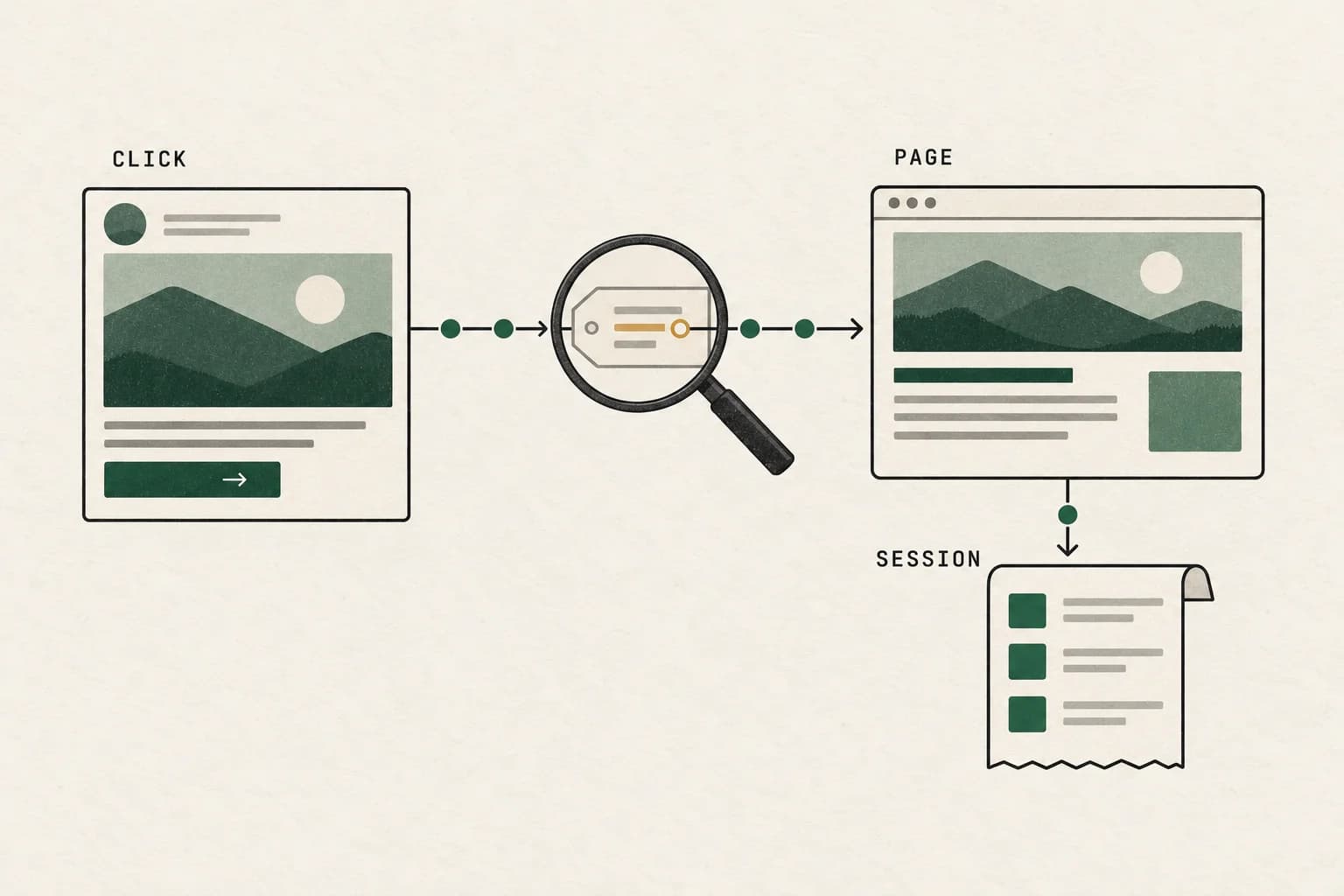
A click can open something inside LinkedIn. A website click can fail to reach a page. A page arrival can occur during an existing session. And a measured session can appear under a different source if campaign information is lost or the wrong report is selected.
This guide turns those possibilities into an investigation sequence. It responds to a discussion about LinkedIn landing-page clicks exceeding GA4 sessions, while using current LinkedIn and GA4 documentation for technical behavior rather than older Universal Analytics advice. The discussion establishes the reader problem; its suggested explanations are not a diagnosis of your campaign.
Start with the right LinkedIn click column#
The earlier Quora question about LinkedIn clicks versus Google Analytics asks the same underlying comparison. Its question was verified in the browser during our initial research. The workflow here uses current GA4 documentation rather than carrying forward historical Analytics settings or community tolerance estimates.
Export the exact metric name, campaign objective, ad format and placement scope. Do not infer what “clicks” includes from the column's short label or from a different campaign type.
For a website-arrival investigation, use the available landing-page-click metric that corresponds to opening the destination URL. Keep engagement and on-platform actions separate. Opening a lead form, viewing a LinkedIn Page or expanding content is not evidence that someone visited your website.
LinkedIn's website-visits documentation distinguishes destination clicks from several on-platform actions and explains that chargeability depends on format, bidding and optimization. A website-visits objective is not by itself proof that the invoice is based on clicks; some strategies charge for impressions.
Build a compact metric dictionary:
| Export field | Question it answers | Appropriate comparison |
|---|---|---|
| All selected click or engagement metrics | Which interactions did this field include? | Its documented interaction definition |
| Clicks to landing page | How many recorded clicks opened the destination URL? | Website arrival evidence, with limitations |
| Lead-form actions | What happened to the on-platform form? | Form reporting and lead records |
| GA4 sessions | How many sessions did Analytics measure? | Session-scoped acquisition reporting |
| GA4 key events | How many defined outcomes occurred? | Outcome definition and attribution settings |
Avoid a blanket claim that every LinkedIn Clicks column counts exactly the same actions. Format and objective matter. Preserve the exported field's current definition in the incident record so a future dashboard change does not silently change your comparison.
Trace the LinkedIn click to the measured visit
A platform click may not reach a page or start a new GA4 session. Discuss what the redirect and analytics records can show.
Discuss measurement optionsA short inquiry to scope relevant options; no campaign access is needed.
Understand why clicks and sessions cannot be equal by definition#
Google defines a session as a period of interaction that begins when a page or screen is viewed and no session is active. The default inactivity timeout is 30 minutes, although a property can configure it differently.
Consider an illustrative user who opens an ad, reads the landing page and opens the same ad again five minutes later in the same browser context. Two recorded destination clicks do not necessarily create two new GA4 sessions. Session state and implementation determine the measurement outcome.
Conversely, a later visit may produce a session without a new LinkedIn click in the reporting interval. Saved links, return visits and reporting boundaries complicate the comparison. A simple sessions-divided-by-clicks ratio is a diagnostic indicator, not a direct loss-rate measurement.
Do not change the session timeout to make the ratio approach 100%. That changes what a session means and can break comparisons with earlier reporting. First identify whether the apparent gap is definitional, a measurement failure or a source-attribution problem.
Choose session-scoped GA4 reporting#
For campaign traffic, begin with Traffic acquisition and session-level source/medium and campaign dimensions. Inspect the exact source values used by your URLs rather than filtering only for the channel name you expected.
Google's comparison of acquisition reports distinguishes first-user acquisition from session acquisition. A returning visitor initially acquired through another channel can appear differently under those scopes. Filtering First user source to LinkedIn will not retrieve every session influenced by a current LinkedIn campaign.
Likewise, conversion credit is a separate question from arrival measurement. GA4's traffic-source scope guidance distinguishes user, session and event dimensions. Changing an event attribution model is not a repair for a missing page request or a lost campaign parameter.
For the separate campaign-credit question, reconcile LinkedIn conversion attribution using the selected action, click and view windows, Each versus Last allocation and business cohort. A correct arrival count does not establish a one-to-one customer count in Campaign Manager.
Align the following before comparing totals:
- Same campaign and creative set, including any duplicated or renamed campaigns.
- Same completed interval, with both platforms' time zones recorded.
- Same website, GA4 property and web data stream.
- Same intended destination pages and placement scope.
- Explicit metric and dimension names, plus active report filters.
Check more than one report row. A naming inconsistency may split LinkedIn traffic among linkedin, LinkedIn, a referral row and an unexpected medium. Review the underlying source/medium values before assuming all unclassified traffic was never measured.
Trace the route from the ad to the first measured page#
Draw the actual redirect chain for one authorized test. It may include the ad's click handling, a tracking redirect, a short link, a language redirect, an HTTP-to-HTTPS upgrade or a landing-page routing rule.
At each hop, record the destination, response status, elapsed time and preserved campaign parameters. The browser's address bar at the end is useful evidence, but a redirect can already have removed important information before the analytics tag runs.
Use this test log:
Ad/creative reference:
Exact destination configured in the ad:
Test timestamp and browser/app context:

Hop 1: destination, status, campaign parameters present
Hop 2: destination, status, campaign parameters present
Final landing URL:
Final page response and visible content:
Analytics property/data stream receiving the test:
Consent state and expected measurement behavior:
Observed page event and campaign information:
Record the actual browser path, including the LinkedIn app's browsing context if that is relevant to the campaign. A successful test performed by pasting the final URL into desktop Chrome validates a different route from clicking through an in-app browser.
Do not presume that in-app browsers always lose tracking. Test them. Compare the same destination and privacy conditions across environments, then name the first observed failure instead of treating the environment label as the cause.
For the general paid-media pattern, see our Google Ads clicks versus GA4 sessions guide. The underlying distinction is similar, while LinkedIn's metric definitions and click path require their own checks.
If a visit already appears in a recording but its visibility timeline looks wrong, diagnose hidden-page events inside a captured visit using controlled browser actions and matched evidence.
Make UTM tagging predictable and test the final URL#
Google's URL-builder guidance recommends consistent campaign parameters and notes that their values are case-sensitive. Use a documented naming convention so the same source is not split into several spelling variants.
For example, this is an illustrative destination, not an executable LinkedIn macro template:
https://www.example.com/demo
  ?utm_source=linkedin
  &utm_medium=paid_social
  &utm_campaign=measurement_guide_october
  &utm_content=single_image_a
Remove the line breaks when constructing the real URL. Use your approved campaign taxonomy and valid destination. If you use dynamic parameters, verify LinkedIn's currently supported syntax and inspect the actual substituted URL rather than copying another platform's placeholders.
Test these cases:
| Case | What to verify |
|---|---|
| Destination already has a query string | New parameters append correctly without a second question mark |
| Redirect or localization rule | Required parameters survive to the measured page |
| Multiple carousel destinations | Each intended destination uses the agreed tracking taxonomy |
| Router changes the address | Initial campaign information is captured at the expected time |
| Case or naming variation | Reporting does not unexpectedly fragment one campaign |
Do not place email addresses or other personal information in campaign parameters. A URL can be copied, logged and shared through systems outside your intended audience. Stable campaign and creative references are usually enough for this investigation.
If the final page retains the expected UTMs but the campaign row is missing, move to tag execution and report scope. If the parameters disappear before the page, repair that handoff first. Those are different owners and different fixes.
Test consent behavior explicitly#
Consent affects which measurements are collected and how they are represented. It should not be treated as an inconvenience to bypass in order to match an advertising dashboard.
Google's consent-mode documentation distinguishes basic implementations that block tags before consent from advanced implementations that can send measurements without cookies under denied storage consent. Actual behavior depends on the consent setup and applicable configuration; denied consent does not have one universal reporting outcome.
Use permitted QA scenarios for an initial visit, a granted choice, a denied choice and a later update. For each, record the intended tag behavior, the observed requests and the stored choice on the next page. A test that grants consent after the first page has already been lost needs a different diagnosis from a test that never permits collection.
Do not estimate that “the missing 40% must be consent” from an aggregate gap. Check consent-related measurements and comparable test evidence. Also keep modeled reporting separate from directly observed requests; modeled totals cannot identify exactly which individual click reached the page.
The repair target is correct consent-aware behavior. If the implementation is working as intended but some visits are unobservable in analytics, describe that coverage limit in the report instead of fabricating sessions to close the difference.
Use the expanded Google Ads/GA4 diagnostic to test consent states and distinguish modeled sessions. Keep the approved collection behavior and the reporting surface explicit.
Confirm tag receipt, then confirm the reporting result#
Inspect whether the intended analytics tag runs on the first page, uses the correct property and emits the expected page event under the tested consent state. Check whether a single-page application changes routes before measurement initializes, and whether a template accidentally omits the tag on some landing pages.
Google's DebugView documentation supports inspecting an authorized test device's events and parameters. It also notes privacy-related visibility limitations and recommends acquisition reports for fuller attribution analysis. An absent DebugView event under denied analytics consent is therefore not, by itself, proof that the site ignored the click.
Keep the evidence stages separate:
- The browser requested the page.
- The page returned the intended content.
- The analytics integration emitted an allowed request.
- The intended property received the test event where observable.
- The completed report represented the session under the expected scope.
A server log can support stages one and two. It does not automatically establish a human visit, successful rendering or a GA4 session. Automated fetches and repeated requests need their own handling before using server totals as a denominator.
Likewise, do not forward every server request as a synthetic analytics session. That can manufacture duplicates, bypass consent decisions or turn a diagnostic log into a different measurement system without an agreed methodology.
A worked example without pretending clicks are lost users#
The following is a hypothetical teaching example. It is not a LinkedIn benchmark or an observed AdProof customer result.
Suppose a campaign dashboard shows 1,000 actions in the selected click-related column. A matching export shows 700 clicks to the landing page. GA4 shows 420 sessions in the expected LinkedIn campaign row.
The initial comparison makes it sound as if 580 visitors disappeared. That conclusion is premature: 300 of the selected actions were not destination clicks, and destination clicks are not necessarily new sessions.
Assume an authorized QA process and supporting campaign evidence establish the following reconciliation in this illustrative case:
| Diagnostic category | Count | Interpretation |
|---|---|---|
| Selected actions that were not destination clicks | 300 | Remove from the website-click comparison |
| Destination clicks that did not produce a new session because a session was active | 80 | Definition difference, not demonstrated page failure |
| Visits with the campaign parameters stripped but sessions measured elsewhere | 70 | Attribution implementation issue |
| Visits not directly measured under intended consent behavior | 50 | Measurement coverage limit |
| Verified destination or analytics implementation failures | 40 | Repairable defects established by evidence |
| Still unresolved | 40 | No confirmed explanation |
| Sessions in the expected campaign row | 420 | Observed result in the selected reporting scope |
The categories sum to 1,000 in this simplified example because each action is assigned once under explicitly assumed evidence. Real investigations often cannot make a click-to-visit join, particularly under privacy restrictions. In that case, present observed stage totals and unresolved differences instead of asserting exact event-level categories.
The appropriate next steps differ: correct stripped parameters and confirmed failures, preserve consent behavior, explain active-session effects and continue investigating the unresolved remainder. A single “tracking loss percentage” would conceal those distinctions.
Choose the next action from the first failing boundary#
| Observation | Next action | Avoid concluding |
|---|---|---|
| Most selected actions stay on LinkedIn | Select the correct destination-click metric | That website tracking lost every action |
| Destination fails or redirects incorrectly | Repair the route and reproduce the original click path | That analytics is the first failure |
| Page loads but UTMs disappear | Trace redirect/router parameter handling | That the ad delivered invalid traffic |
| Correct parameters, wrong property | Correct the integration and verify receipt | That a report filter will recover missing data |
| Correct receipt, unexpected campaign row | Review scope and source values after processing | That no visit occurred |
| Denied-consent test lacks cookie-based session visibility | Compare with intended consent implementation | That consent should be disabled |
| Only one browser or landing template fails | Reproduce that environment and inspect changes | That every campaign is affected |
Prioritize by absolute affected destination clicks, business impact and the start of the change. Preserve unaffected destinations as controls. A strong finding names the configuration, the failing test and the evidence; it does not stop at “GA4 undercounts.”
Verify a repair with the same route and reporting scope#
Retain the original destination, tag configuration, release time and reproduction. Make one controlled change, then retest the original click path under the same environment and permitted privacy state.
Confirm that the destination works, parameters survive and the intended property receives the observable event. Review a completed reporting interval with the same session dimensions and filters. Track the expected campaign row together with other source rows so redistribution is not confused with newly recovered visits.
Watch for new duplication. A tag added to fix one missing template can run alongside an existing integration on another template. More events after a release are not automatically better measurement; verify the event sequence and intended session behavior.
Use our campaign delivery verification workflow when the question extends beyond site analytics to whether media ran as purchased. Impression delivery, website arrival and business outcomes need related but distinct evidence.
Frequently asked questions#
What discrepancy between LinkedIn clicks and GA4 sessions is normal?
There is no universal percentage that diagnoses the campaign. Start with destination clicks and session-scoped GA4 reporting, then test the route and measurement implementation. A sudden change on one landing page deserves investigation regardless of an industry-average claim.
Do LinkedIn landing-page clicks prove the page loaded?
They describe recorded clicks opening the destination URL, not a GA4 receipt or a new session. Inspect redirects, final-page responses and analytics evidence to establish what happened next.
Can one person generate several clicks but only one session?
Yes. A new click does not necessarily begin a new session while a session remains active. Test the actual browser context and configured session behavior rather than assigning one session to every click.
Should I use User acquisition or Traffic acquisition?
For this session comparison, begin with Traffic acquisition and session-scoped dimensions. First-user acquisition answers a different question. Keep conversion-attribution analysis separate from testing page arrival and session measurement.
Should I remove the consent banner to improve the match?
No. Validate that the implementation follows the intended consent choices and reports its coverage limits. A closer ratio obtained by changing privacy behavior does not demonstrate a more accurate comparison.
Does a low sessions-to-clicks ratio prove bot traffic?
No. It can reflect metric scope, existing sessions, route failures, campaign tagging or measurement coverage. Investigate traffic quality using appropriate evidence; a mismatch between two different metrics cannot establish invalid traffic by itself.
Keep the click, arrival and session in view#
The useful result is a documented comparison that identifies what was counted, where a confirmed defect occurs and what remains unobservable. It gives the media team, website team and analytics team distinct actions without inventing a one-to-one relationship between clicks and sessions.
Read AdProof's independent measurement approach, explore measurement workflows, or discuss a campaign review with the exports, destination routes and integration questions your team needs to reconcile.
Sources and research notes#
Researched on 25 October 2026. The worked example, test sequence and templates are original illustrative material. No loss-rate benchmark is asserted. The community question supplies the reader problem; current platform documentation supports the technical distinctions. Confirm the definitions for the exact LinkedIn format and current GA4 implementation you use.
- LinkedIn: Chargeable clicks for website visits campaigns and ad sets.
- Google Analytics: About Analytics sessions.
- Google Analytics: User acquisition versus Traffic acquisition.
- Google Analytics: Scopes of traffic-source dimensions.
- Google Analytics: Collect campaign data with custom URLs.
- Google: Consent mode concepts.
- Google Analytics: Monitor events in DebugView.
Trace the LinkedIn click to the measured visit
A platform click may not reach a page or start a new GA4 session. Discuss what the redirect and analytics records can show.
Discuss measurement optionsA short inquiry to scope relevant options; no campaign access is needed.