
- Published
- Nov 1, 2026
- Reading time
- 11 min read
CM360 Floodlight Counts: Events, Users, Sessions and Sales
Audit CM360 Floodlight counting methods and units. Separate tag activity, daily or session counts, transactions and items before explaining a discrepancy.
In this guide (10 sections)
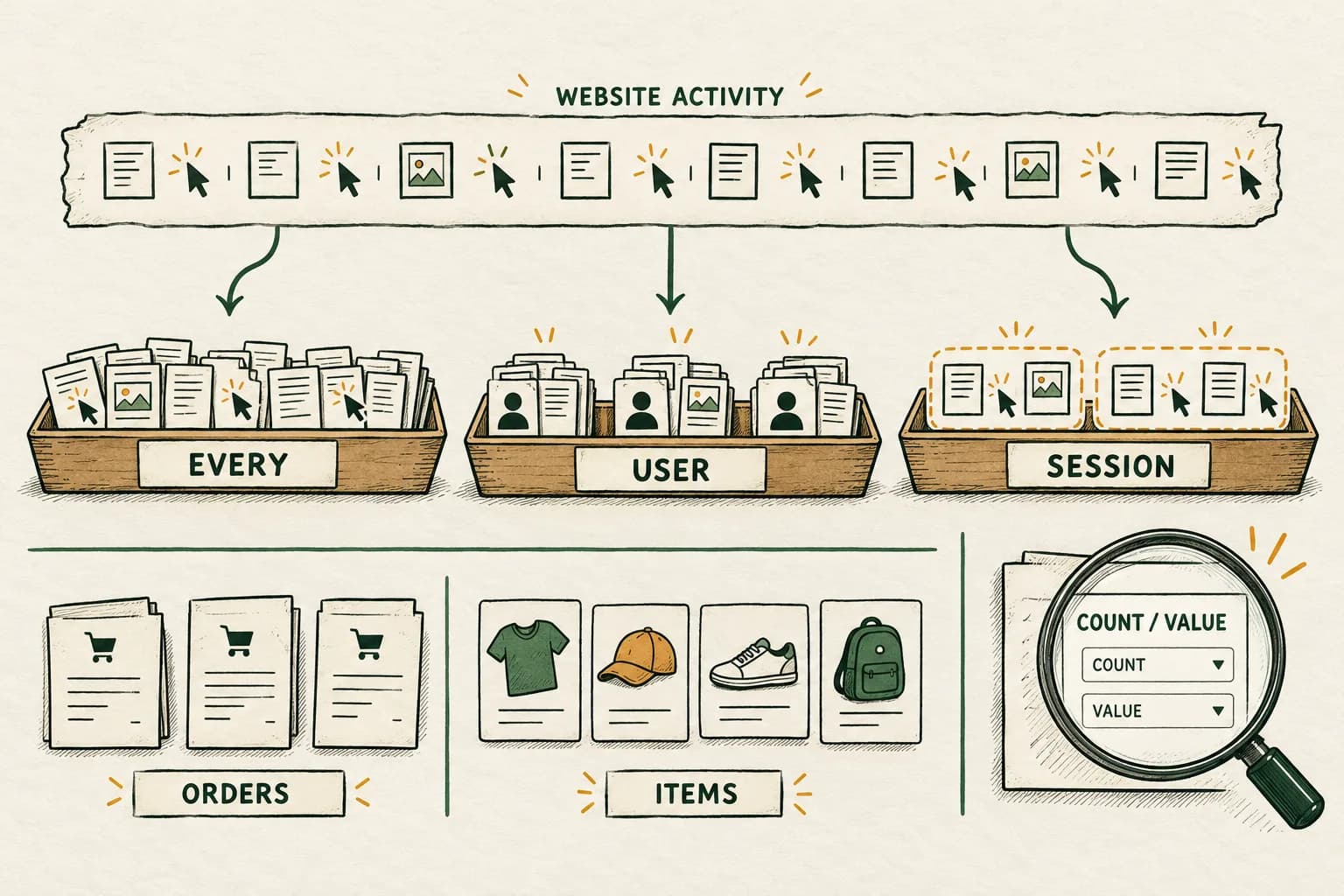
A Floodlight tag firing, a counted conversion, a transaction and an item sold are different observations. Before comparing them, record the actual Floodlight configuration, Count and Value settings, deployed tag format and report metric. A difference can come from different counting rules even when the underlying events are the same.
Then investigate collection and attribution separately. A counting definition does not excuse a broken implementation, and an unusual ratio does not establish fraud. The useful result is a reproducible explanation of which records exist, how they are grouped and which remain unresolved.
Two real questions, different counting assumptions#
An older ad-operations question about high Floodlight conversions reports far more attributed conversions than ad impressions. The author later explains that the action is a promotional landing-page visit, not a purchase, and that the activity counts everything. Replies suggest fraud, implementation problems and counting-policy checks. The discussion does not verify a cause.
A separate historical landing-page-view discrepancy compares clicks with Floodlight activity. Its author reports an implementation fix involving a unique counter, while comments mix counting explanations with generic acceptable-gap claims. That reported fix is historical context, not a universal tag recipe.
Both originals were opened for this research. They are evergreen provenance, not evidence of a new incident. The shared missing step is to define the event and count before interpreting the ratio.
Check how Floodlight is configured to count
A tag fire, counted conversion, transaction and item sold are different observations. Discuss how the configuration maps to your reporting question.
Discuss a measurement questionA short inquiry to scope relevant options; no campaign access is needed.
1. Name the three measurement boundaries#
Google's Floodlight counting reference distinguishes a Floodlight impression generated by tag activity from conversion credit checked against advertising interactions and windows. The phrase Floodlight impressions therefore must not be substituted for a campaign's ad-impression count.
Use three separate worksheet sections:
| Boundary | Evidence to preserve | Question it can answer |
|---|---|---|
| Business or website action | An authorized event or order record with its definition | Did the intended action occur? |
| Collection and counting | Deployed tag, receiving evidence and applicable counting settings | What was sent and how is repeated activity treated? |
| Attribution and reporting | Exact metric, selected activity, dimensions, windows and dates | Which counted outcomes receive credit in this report? |
A landing-page visit need not be a sale. A sale can contain several items. A browser can trigger a tag without producing credit for the campaign being inspected. Keep those facts separate in the report's labels.
For the advertising-side units, the impressions, clicks, reach and conversions guide supplies a broader metric dictionary. It does not make a count from one boundary a substitute for another.
2. Record current settings without translating away the evidence#
Save the Floodlight configuration and conversion/activity identifiers, event meaning, Count setting, Value setting, group selection and effective dates. Also retain the deployed tag or GTM template version, trigger, report dates, timezone and extraction time. Keep real identifiers in restricted evidence rather than a public article or screenshot.
Current documentation uses multiple vocabularies. Google's creation guide compares legacy Standard, Unique and Per session with newer Every, One per user and One per session labels. It also presents legacy Transactions and Items sold beside separate Count and Value settings.
Record the literal labels visible in the affected setup. The comparison table is a reading aid, not proof that every existing advertiser has migrated or that changing a label leaves the implementation unchanged. No migration date or account rollout is established by this guide.
For an authorized API inventory, Google's Floodlight activity resource also exposes counting-method metadata. An API enum, a GTM template option and a current interface label are different configuration surfaces. Preserve their values and version before assuming they describe the same deployed behavior.
3. Resolve the daily-window wording before applying it#
The reviewed primary pages are not completely consistent. The general counting reference and the creation guide's comparison table describe One per user using a 24-hour-day boundary. In the creation guide's setup instructions, its One per user entry omits that interval, while a separate Unique entry retains it.
Meanwhile, the GTM Floodlight Counter reference explicitly describes its legacy Unique option as midnight to midnight in US Eastern time. That is a specific documented template behavior, not permission to assign that timezone or a rolling 24-hour rule to every newer setting.
If this boundary matters to your discrepancy, preserve the account's literal setting, tag family, relevant help text and a small authorized sample around the boundary. Ask the implementation or platform owner to confirm the applicable reset rule. Keep the uncertainty in the worksheet until it is resolved; do not select whichever wording makes the totals match.
Also avoid treating platform user identity as a perfect count of people. A deduplication rule operates on the identity available to the measurement system. It does not independently prove that two browsers represent two people or that one recognized user has only one business account.
4. A session rule needs a session definition#
The Google-tag field reference describes session_id for per-session counter measurement and leaves the site's session definition to its implementation. Do not silently replace that with GA4's session timeout or a reporting tool's own sessionization.
For the relevant integration, retain the session-key owner, when a key begins, when it changes and how repeat events obtain the same key. Check whether a login transition, router change, reload or backend handoff changes that value unexpectedly. These are diagnostic recommendations; reproduce them in an authorized test context before attributing production differences to them.
Keep this independent from the trigger. A trigger can execute repeatedly while a counting rule groups eligible activity. Conversely, changing a trigger to fire once can hide an implementation problem without validating the receiving count. Save both execution observations and the receiving surface that supports your conclusion.
Hypothetical counter worksheet
Assume five qualifying occurrences of the same action in a controlled ledger. Identity is stable, the session grouping is explicitly defined and every occurrence lies within one applicable daily boundary. Ignore collection failures and attribution exclusions to isolate the definitions. These are invented teaching records, not actual platform results.
| Measurement identity | Site session | Occurrences |
|---|---|---|
| A | A1 | 2 |
| A | A2 | 1 |
| B | B1 | 2 |
| Total | Three defined sessions | 5 |
An every-occurrence definition gives five. Grouping once per measurement identity within this single daily window gives two. Grouping once per identity and defined session gives three.
The gap between five and two is 3 / 5 = 60% of the occurrence count. It is explained by the stated grouping in this simplified example; it is not a 60% loss of orders or proof of invalid traffic. The ledger also does not claim that five network requests or five attributable conversions must appear in a real account.
Use a similar small worksheet to state the result you expect before testing. Avoid reproducing it by repeatedly loading live ads or submitting fake production purchases.
5. Keep sales transactions, item quantity and value separate#
The creation guide now presents financial Value options separately from Count. The GTM Floodlight Sales reference also distinguishes transaction revenue, order identity and item quantity in the relevant sales-tag configuration.
Choose the report's actual unit before calculating a discrepancy. A field summarizing item quantity is not an order counter, and a field summing monetary values is neither of those. Preserve currency and the source definition of value alongside the quantity.
A separate hypothetical sales ledger contains two accepted orders: one with two items and one with three. It supports two order events and five items. If their consistently defined values are USD 40 and USD 90, the monetary total is USD 130. Those three totals answer different questions.
This is not a claim that every current field named Conversions must display five for that ledger. The selected counting method, Value configuration and report definition determine the actual metric. Google's general reference explicitly distinguishes conversion and transaction metrics; inspect the exact column instead of deriving its meaning from a legacy label.
Check how the deployed tag maps the order reference, quantity and value. A variable named order ID is not proof that the outgoing field contains an order identifier. Repeated order IDs, wrong quantity mappings and duplicated triggers require their own collection evidence; a unique-user setting is not a generic transaction-ID repair.
6. Verify the deployed format before changing parameters#
Google's Floodlight troubleshooting guide separates implementation alerts for iframe/image tags and Google tags. It includes different checks for required quantity, unique-counter parameters, cache busting and numeric value.
Use the section for the actual format. Do not copy an old ord instruction from a forum into every current implementation: the same legacy field participates in different contexts, and Google-tag fields have their own mappings. Prefer a fresh, saved configuration export and a controlled comparison with the deployed request.
For an existing offline record that changes after an API edit, verify the CM360 identity and replacement-value contract alongside receiving-report evidence.
A practical acceptance matrix is:
| Test case | Evidence to retain | What remains separate |
|---|---|---|
| One authorized action | Trigger, destination and receiving observation | Campaign attribution |
| Same action repeated | Execution sequence and counted result under the defined rule | Distinct people or accepted orders |
| New defined session | Session-key change and matching setup | Another analytics product's session total |
| Daily boundary, if applicable | Confirmed timezone/reset rule and paired observations | Universal cross-product identity |
| Two valid orders | Order references, quantity and consistently defined value | Item count versus order count |
| Replayed or duplicated sender path | Original event identity and both executions | Whether a specific receiver deduplicated it |
Changing an activity or tag format in a control interface does not prove the website uses the updated tag. The creation documentation explicitly separates configuration changes from implementation. Recheck the live version through the supported QA workflow before declaring the issue corrected.
7. Investigate attribution after the counting contract is clear#
Next align the campaign, selected Floodlight activity, post-click versus post-view population, windows, report date basis, timezone and processing snapshot. A site-wide activity total and a campaign-attributed total are different populations even if both use the same activity name.
When diagnosing CM360 clicks, use the separate click-tracker acceptance guide. A functioning destination, a counted click and a downstream Floodlight action require different evidence. Do not treat one missing measurement hop as proof that all later events are missing.
The platform-versus-independent comparison worksheet helps preserve these counting, scope and maturity choices. If a residual remains, label it unresolved and identify the next observation needed rather than allocating it to fraud or a platform fault.
Finish with a counting contract someone else can reproduce#
Your handover should include the action definition, literal configuration labels, deployed implementation, applicable identity/session/day boundary, exact report metric, a worked ledger and unresolved source wording. Keep conversion counts, transactions, items, monetary values and ad impressions in separate columns.
For campaigns measured with AdProof, request a scoped delivery review with campaign identifiers, dates, timezone and supported export fields. Those exports can document the delivery-side baseline beside your independently obtained Floodlight evidence. They do not configure CM360, supply missing customer identity or guarantee conversion credit. The anonymized fashion-retail delivery case illustrates that bounded reporting workflow, not a Floodlight integration.
Frequently asked questions#
Does Unique mean the tag should execute only once?
Do not infer execution frequency from the label alone. Inspect the actual trigger, transmitted request and receiving counting rule. Repeated execution observations and a deduplicated count can describe different stages of the same implementation.
Is One per user always a rolling 24-hour window?
Do not assume that. Current help pages use inconsistent wording, and the GTM legacy Unique documentation names a specific daily boundary. Confirm the applicable setting and timezone for the affected account and tag family before using it in a comparison.
Should Floodlight conversions equal orders or ad impressions?
Only compare deliberately aligned units and populations. A landing-page counter, attributed outcome, transaction, item quantity and ad impression can each represent something different. Define the metric and its grouping before interpreting a ratio.
Should I switch the method to make two reports agree?
First preserve the original settings and reproduce the difference under a stated counting contract. A method change can redefine the series; it does not validate the old implementation or prove historical data has been repaired.
Check how Floodlight is configured to count
A tag fire, counted conversion, transaction and item sold are different observations. Discuss how the configuration maps to your reporting question.
Discuss a measurement questionA short inquiry to scope relevant options; no campaign access is needed.