
- Published
- Nov 6, 2026
- Updated
- Nov 10, 2026
- Reading time
- 13 min read
GA4 Events Duplicated? Audit Create and Modify Rules
Trace unexpected GA4 events through GTM, Create event rules and ordered modifications. Verify names, source events and business outcomes before removing rules.
In this guide (11 sections)
Before deleting a tag, find whether the extra GA4 event was sent independently, generated from another event or renamed by a modification rule. A GTM tag firing once does not finish that investigation. Write down the actual event names, destination stream, rule conditions and intended business action, then trace one controlled occurrence through that configuration.
Creating a second event is also unnecessary merely to make an already collected event important to reporting. Google's key-event instructions let you mark an existing event as a key event. That designation and generating another event are separate decisions. Neither establishes that a button click was an accepted lead or completed sale.
An older duplicate-event question reveals a configuration gap#
A public practitioner question about duplicated events describes a GTM trigger, a GTM tag and an additional GA4 Create event rule. The poster expected to make the interaction a conversion and then saw two observations. Replies distinguish a lower-case event from a generated, differently capitalized name; the poster says they removed the extra setup.
A separate debugger discussion, started in March 2023, includes a July 2024 reply about removing a generated-event rule. The original poster had excluded manually created events. Those different accounts are a reason to establish each implementation's producer, not to declare one universal cause.
This is an older configuration discussion, not evidence of a current GA4 incident. The reply is useful provenance, but it does not justify deleting every created event. A deliberately generated subset can be legitimate when its definition and downstream use are clear.
This guide owns the rule audit. For repeated virtual pageviews, retain the SPA sender and route-change investigation. For contact forms, establish an accepted-enquiry signal in the business system separately. An event-transformation review does not determine either implementation's business meaning.
Trace the event beyond the rule editor.
When the sender and rule lineage are clear, inspect consent, destination and receipt in the intended property.
Trace the receiving pathOpens a practical guide. No email required.
Define the occurrence before counting its event names#
Choose one action you can observe safely: for example, opening a synthetic resource link on a test page. Decide whether it is meant to produce one operational interaction event, a more narrowly defined reporting event, or both for different purposes.
Use a short contract:
| Record | Intended meaning | Comparison to avoid |
|---|---|---|
| User action | One specified interaction | Assuming every interaction creates a lead |
| Source event | The chosen collection observation | Treating a tag execution as receiving evidence |
| Generated event | A separately named observation meeting a rule | Adding it to its parent as another business occurrence |
| Modified event | The intended revised representation | Assuming the old name must also remain |
| Key-event status | Reporting importance for the chosen name | Assuming another generated event is required |
| Accepted business record | Outcome verified in its owning system | Inferring it from the number of analytics names |
This is a proposed investigation worksheet, not a GA4 upload template. Keep outcome IDs and personal information in their authorized systems. A public troubleshooting example does not need a visitor's email, full tracking URL or order history.
Inventory the source, rules and destination together#
Record the property and web stream being tested, released GTM version, direct Google tag configuration, relevant application code and plugin senders. Keep a separate entry for every created or modified event rule that can affect the chosen source name.
For each rule, retain its exact conditions, output name, parameter treatment, position where applicable, observed effective state and configuration owner. Record a missing permission or unavailable configuration as a gap. A read-only report user might see a resulting event without being able to inspect or edit its origin.
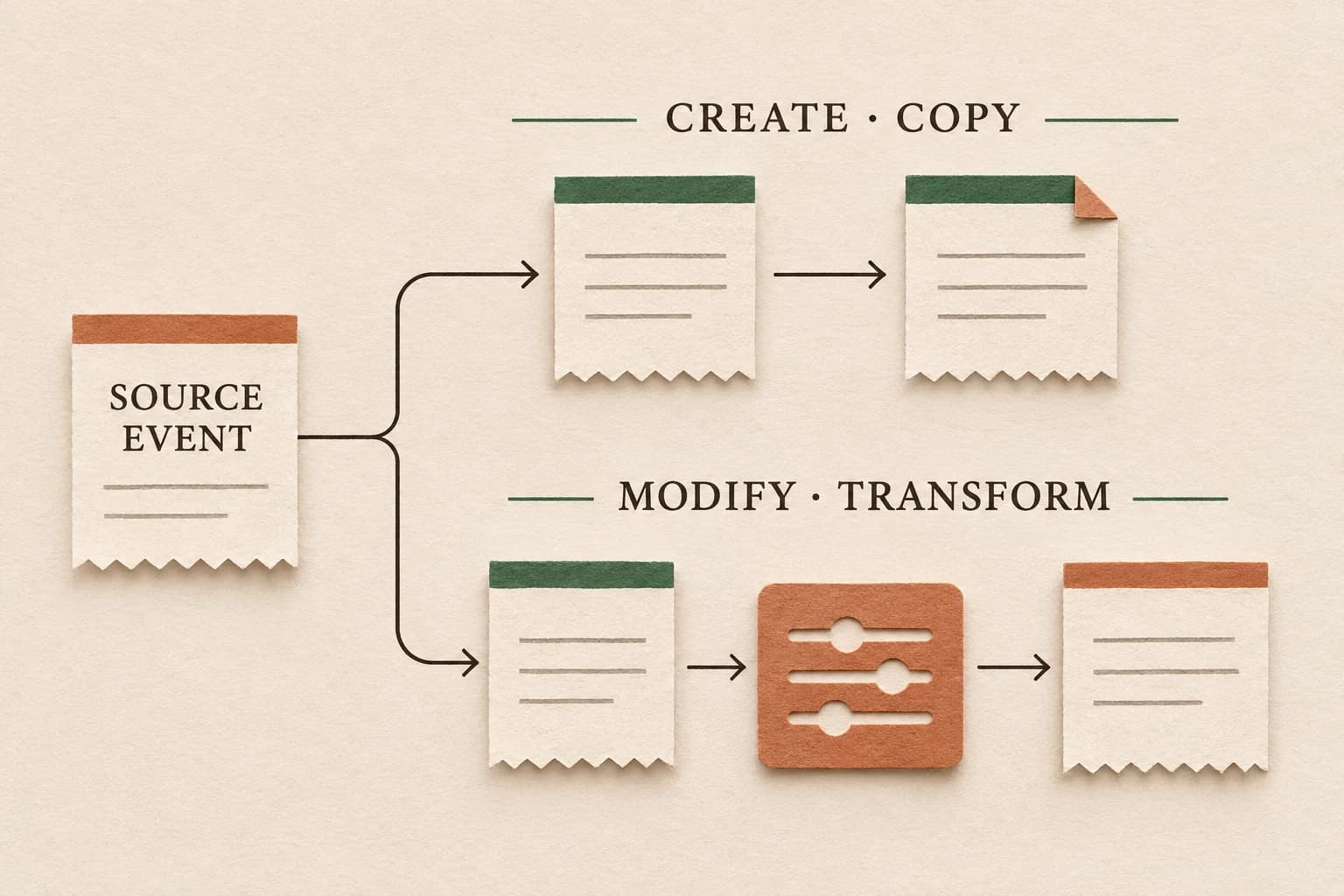
Do not assume the rule is property-wide merely because you opened it from Admin. Google's rename and generate guidance asks users with multiple streams to select the affected stream. The same page distinguishes generating another event from overwriting an existing event and says modifications run before creation rules.
Draw the paths using the actual names. A hypothetical inventory might contain:
resource_open → modification normalizes resource_type → created resource_open_brochure
Alongside that, a plugin might independently send resource_open_brochure. That second sender is an investigation hypothesis until the configuration and outgoing evidence establish it. A visually similar pair of event names does not identify the producer.
Treat capitalization as data, not formatting#
Preserve exact event-name spelling in the worksheet and exports. Google's naming rules treat names as case sensitive. resource_open and Resource_Open therefore require separate entries in the audit.
Avoid normalizing names to lower case while you are trying to discover the problem. A spreadsheet that silently combines variants can hide the relationship between an original and a generated event. Conversely, two rows with different capitalization do not prove the same receiver stored one event twice.
Compare the parameters that define the subset as well as its name. A source covering every resource may intentionally produce a brochure-only event. An overly broad condition could instead match unrelated links. Save matching and nonmatching examples so the team can review that distinction without relying on a category label.
Use synthetic values in shared evidence. Do not put a real visitor identifier into a convenient event parameter merely to make a screenshot easier to follow.
Check dependencies without inventing a creation chain#
The official Event Create Rule reference says creation rules run independently without a defined order. It also says edit/create rules cannot modify an event produced by a creation rule. Do not design a sequence that assumes a newly generated event becomes the next rule's editable input.
Build a dependency table rather than reading rule names as instructions:
| Question | Evidence to retain |
|---|---|
| What source can match this rule? | Exact event name and all matching conditions |
| Which representation reaches the rule? | Relevant earlier modifications and observed parameters |
| Is a second rule expected to use generated output? | Stated dependency and current documented support |
| What will a nonmatching source do? | Negative test and its actual result |
| Is another implementation emitting the destination name? | Sender inventory and outgoing event evidence |
For ordered modifications, inspect the actual configured sequence. Google's Event Edit Rule reference documents processing order. A rule that expects a renamed value needs the intended prior transformation. Record the input and output you expect at each step; then compare the trace. Do not reorder production rules solely because their display names look confusing.
Trace one action across three independent checkpoints#
Use a bounded, authorized test journey and record a sequence number in your own action log. Keep the collection behavior and consent choices that your organization has approved.
First, record the action and the implementation evidence: which trigger or application callback ran, which tag executed and what configuration version was active. Next, inspect the outgoing event names and relevant parameters for the intended destination. Finally, inspect the receiving diagnostic for that tested device and occurrence.
Do not use the number of network requests as an event count. Google's events overview explains that multiple events can be grouped into a request. A request receipt, an event inside its payload and a reporting row are different observations.
Google's DebugView instructions support inspecting a selected debug device and its event parameters. They also note that privacy controls or denied Analytics-cookie consent can prevent events appearing. Keep an absent receiving observation unresolved until its coverage is understood; do not weaken consent settings to force an event into the diagnostic.
A useful finding identifies the first supported discrepancy: a second independent sender, an intentional generated child being added to its parent, a condition matching the wrong source, an ordering dependency, or missing receiving evidence. Each finding leads to a different next action.
If a successful form submission creates two events
A Stack Overflow question about Contact Form 7 and GTM is dated November 6 in the question listing. The direct-page metadata and search-list view counts differed across retrievals, so this preview omits a volatile view total and the latest-activity time. The author reports one successful form submission, one email, and one request to the CF7 endpoint, but two generate_lead rows in GTM Preview and two GA4 DebugView observations. The post does not count how many DOM events or listener callbacks ran. One comment proposes checks for another integration, duplicate DOM dispatch, and repeated listener registration; these are hypotheses, not a diagnosis of that site.
Trace the event-dispatch path before changing conversion settings. Contact Form 7 documents wpcf7mailsent as an event for a successful Ajax submission. In a controlled test, count that DOM event, inspect the number of data-layer pushes, then inspect how many GA4 tags fired and what each sent. Search the approved implementation for every producer of the destination event, including plugin integrations and code that registers the listener. If a Custom HTML tag installs a document listener, verify how many times the installation code ran during that page lifecycle. A single DOM dispatch with two listener executions points to a different boundary from two DOM dispatches or two independent data-layer producers.
Use GTM Preview to inspect event order and tag executions. If the listener is intentionally installed once per page, review whether its trigger or tag-firing option allows repeated installation; Google’s tag-firing options provide a “Once per page” option for code that should load only once. Test navigation, form retries and any single-page-application lifecycle before adopting that setting. It should not be used as a blanket way to suppress legitimate repeat submissions.
The Google Ads import is a separate counting layer. Its “One” count setting means one conversion after an ad click/interaction under that action’s rule; it does not remove a duplicate event from GA4 or identify which listener sent it. Preserve the distinct action, event and conversion counts, and correct the demonstrated producer only after the test narrows the source. Do not use a report filter or an attribution setting to hide the instrumentation defect.
Work a hypothetical parent-and-subset example#
Assume a controlled test contains ten deliberate resource openings: six brochures and four specifications. The approved design sends one resource_open for each action and generates one resource_open_brochure for each brochure. For this example, all ten sources are collected and the rule performs exactly as defined.
| Observation under the stated design | Count |
|---|---|
| Distinct deliberate resource openings | 10 |
Source resource_open events | 10 |
| Generated brochure-subset events | 6 |
| Sum of both event-name rows | 16 |
Sixteen analytics observations do not establish sixteen resource openings. The six generated events describe a subset of the same ten actions. Reporting sixteen as unique interactions would overstate this fixture by (16 − 10) / 10 × 100 = 60%, using deliberate actions as the denominator.
Now suppose independent evidence reveals a plugin sending the same brochure destination event for every brochure as well. The expected destination count remains six under the stated policy, while twelve observed destination events require another investigation. Do not claim that cause from twelve alone; the separate sender evidence is essential.
These invented figures illustrate two different issues: adding a legitimate subset to its parent, and overlapping collection for the subset. A correction to either count is not evidence of better traffic, more leads, recovered advertising spend or repaired historical data.
Test exclusions and repeat behavior before changing anything#
Your acceptance cases should include a matching action, a nonmatching resource, a second legitimate opening, a reload and another consent state where appropriate. Add any route transition or embedded component that actually participates in collection.
For each case, write the expected source count, generated count and relevant parameter values before observing the result. A test that checks only the final total can miss a correct number assigned to the wrong resource. A rule that suppresses every repeat might also erase legitimate later actions.
Keep business acceptance separate. If the event concerns a form or purchase, a matching URL or generated event still needs the relevant business contract. Do not generalize the resource-opening example into a lead-quality or sales-counting guarantee.
Make a bounded correction and preserve the affected period#
Select the demonstrated defect and identify its configuration owner. Removing an unnecessary generated rule, narrowing a condition, revising an ordered modification or removing a duplicate implementation sender are different changes. Preserve the original configuration and effective dates before selecting one.
Google's rename/generate guidance says rule changes do not rewrite historical data; it specifically states that modifications run client-side and cannot modify Measurement Protocol server-to-server events. Google separately documents that Data Manager API events do not trigger create or rename rules; do not generalize the Measurement Protocol statement to that route. The guidance also allows an hour or more for changes to take effect. Test the actual receiving path and effective configuration rather than assuming an immediate historical repair.
Review downstream dependencies before a rename: selected reports, key-event names, audience definitions and any separately managed advertising conversion actions. Google's same guidance warns that renaming a key event does not preserve its key-event designation under the old name. Verify the intended name explicitly; do not duplicate the underlying action simply to retain a label.
Retain the test cases, configuration change, rollout time, comparable extracts and remaining gaps. Use the marketing tracking QA checklist for the wider release. If receiving evidence is missing after the rule audit, continue with the request-to-report diagnostic rather than adding another tag by default.
Keep delivery evidence beside the event contract#
For an advertising investigation, retain the campaign, dates, timezone and counting basis alongside this on-site trace. An ad impression and a resource opening are different units. The anonymized fashion-retail duplicate-counting case illustrates the need for a counting policy; it does not establish GA4 rule behavior or customer lead outcomes.
Discuss a scoped evidence review with AdProof and identify the campaign-event or report exports available for your agreed scope. Bring the GA4 rule inventory and receiving trace from their owning systems. This does not imply that AdProof edits Google Analytics rules, provides a native GA4 integration or restores missing attribution.
Frequently asked questions#
Do I need to create another event to mark an existing GTM event as important?
No. Once the intended event is collected and its business meaning is verified, you can mark that existing event as a key event. Generating a new event is a separate choice for a defined subset or other explicit measurement requirement.
Does one GTM tag execution rule out extra GA4 events?
No. Include generated-event rules, modifications and other collection implementations in the audit. Match the action, names, parameters, destination and receiving evidence before identifying where an extra observation originated.
Can I add a generated event to its source to calculate unique actions?
Not when both describe the same underlying occurrence. Define the populations first. A source and its generated subset can be useful separate report rows while their sum overcounts distinct business actions.
Will removing a rule repair the old reports?
Do not assume that. Preserve the affected period and the rule's effective configuration, then verify future collection after the authorized change. Historical interpretation and any downstream reporting correction need their own documented treatment.
Trace the event beyond the rule editor.
When the sender and rule lineage are clear, inspect consent, destination and receipt in the intended property.
Trace the receiving pathOpens a practical guide. No email required.