
- Published
- Oct 30, 2026
- Updated
- Nov 4, 2026
- Reading time
- 11 min read
Why Does a CTV Campaign Report Clicks? An Evidence Checklist
Investigate unexpected CTV clicks by separating remote, QR and companion interactions, tracker requests, landing visits, creative tests and conversion credit.
In this guide (10 sections)
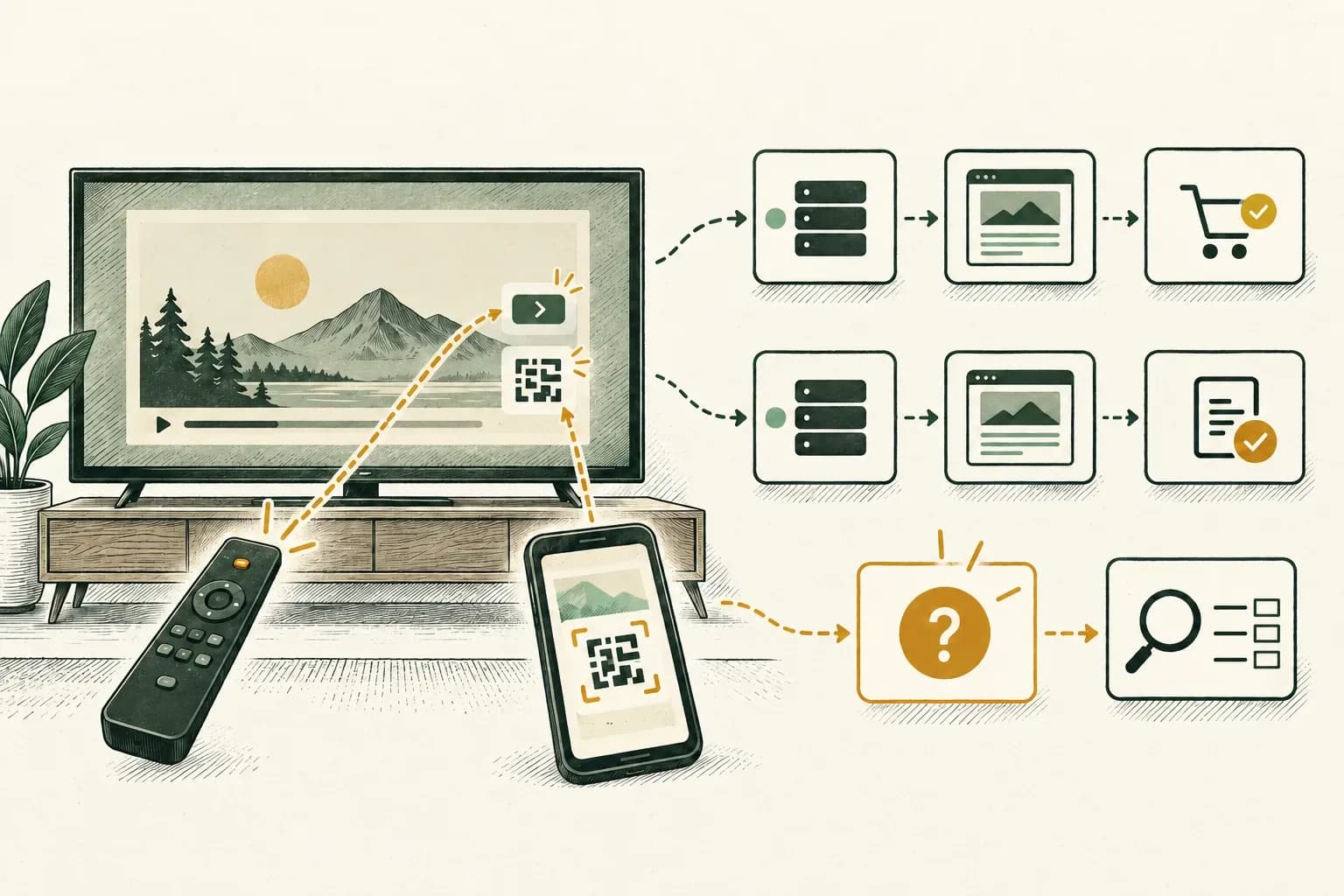
A CTV click report needs a definition before it needs a fraud explanation. Confirm the actual device and ad format, identify the interaction the report counts, and trace the request through the measurement system. Keep remote interactions, QR destinations, companion creatives, landing visits and attributed conversions separate.
If the affected placement was explicitly sold and implemented without an interaction path, investigate that contradiction. The existence of interactive TV formats elsewhere does not explain this placement's clicks. Conversely, the absence of a mouse does not make every CTV interaction impossible.
An older archived ad-operations question describes unusually high ad-server clicks and conversions on inventory the buyer understood to be non-clickable. In a follow-up, the author reported that publisher creative testing appeared to explain a substantial part of that account's discrepancy. That is a useful investigation lead from one reported case, not proof that testing, a particular vendor or invalid traffic explains another campaign.
Establish what was bought and what actually rendered#
Start with one affected placement and creative. Ask the publisher to confirm the supported released format: ordinary video, a remote-selectable call to action, an end card, a QR destination or another documented interaction. Retain a representative device recording and the agreed implementation rather than inferring functionality from a media-plan label.
The IAB Tech Lab's digital-video and CTV format guidelines, v2.0, describe optional QR and remote interactions. Their QR section distinguishes codes embedded in the creative from sell-side generation. Confirm which party controls the destination and tracking. These possibilities do not establish that every publisher implements them or that every action becomes a website click.
Also distinguish CTV from OTT. A streaming buy can include non-TV devices, while the campaign name may still say TV. Use the CTV-versus-OTT device audit to verify the delivered population. A phone visiting the destination after a TV interaction is a different observation from the original ad rendering on a phone.
For browser inventory using IMA HTML5, check the custom click element's SDK eligibility and lifecycle separately from TV remote, QR and companion measurement.
If the publisher confirms there is no interaction element, keep that statement attached to the affected inventory scope. Do not dismiss the problem by citing an unrelated clickable format, and do not declare the entire campaign misrepresented before checking delivered evidence.
Understand what your CTV click report counts.
Compare the device, ad format and interaction before interpreting the reported clicks.
Discuss video measurementA short inquiry to scope relevant options; no campaign access is needed.
Make a metric dictionary for the discrepancy#
Copy the exact column names and definitions from each system. A report named clicks may describe a different trigger or include different components from another report with the same name.
| Observation | Evidence needed | What it does not establish alone |
|---|---|---|
| Remote/controller action | Supported element, action trigger and runtime record | A website visit or purchase |
| QR destination request | Deployed code's destination and observed request path | A unique scan, person or TV impression |
| Companion-creative click | Served component and that component's reporting definition | A click on the main video |
| Tracker request | Request recipient, timestamp and interpretation | Human intent or an accepted reportable click |
| Landing-page activity | Destination receipt and relevant analytics definition | Which TV exposure caused it |
| Attributed conversion | Outcome, credit rule, window and reporting scope | A click on the TV or incremental lift |
These are audit distinctions, not universal platform column definitions. Ask each provider which row its metric actually belongs to.
For a specific example, Google's DV360 metric reference defines Companion Clicks (Video) separately for additional creatives accompanying in-stream video. That column does not establish that a companion existed on your particular TV placement. Obtain the served-component evidence before using it to explain the total.
Do not combine component-level interactions and main-ad clicks unless the provider's documented total includes them in the intended way. Preserve the original export so a later explanation does not silently replace the initial metric.
Identify the destination the format actually supports#
Draw the declared path for the affected format. A remote action might open an app or a deeper location within it; a QR experience might lead to a website on another device. These outcomes require different acceptance checks.
Google's current Google TV Masthead guidance provides a scoped example: configured assets determine whether the action opens TV content, an app or deep link, or a QR-based website destination. Its metrics define Clicks for a user focusing on the ad and opening the TV app or scanning the QR code. This is one format's contract, not a rule for all YouTube ads, CTV apps or QR campaigns.
For the actual deployment, record the creative version, visible action, destination configuration and any redirect owner. Check the released asset; a QR image or end card delivered to an approval team may differ from the final campaign version.
Test a QR destination without assuming the tracker sees a scan. Establish which observed request comes from which authorized action. If a tracking provider reports an interaction category, obtain its counting method and supported integration. Do not rename website requests as unique QR scans because a spreadsheet needs a cleaner label.
Trace the request before changing filtration#
Preserve the generated tag, the deployed configuration and an authorized runtime trace. Identify which component invokes each URL and which system receives it. A tracker present in a response is configuration evidence; a request reaching it is transport evidence; accepted reporting requires that recipient's counting rules.
For one affected example, collect the permitted creative and placement references, timestamps with timezone, component or event type, request/redirect sequence and resulting report scope. Avoid copying full identifiers or credentials into public tickets.
Ask a narrow question: did the request follow the declared interaction, occur during a supported test, fire when only video began, or arrive without enough evidence to classify it? Keep an unknown result available.
If the issue concerns a missing or bypassed CM360 tracking hop, use the click-tracker diagnostic. Its platform-specific macro and tag instructions should not be copied indiscriminately into a TV player. Identify the system responsible for substitution and the documented field that consumes it.
Do not call a request malicious solely because it originates from infrastructure or lacks a familiar browser signature. Likewise, do not assume a server name makes the activity acceptable. The declared event, supported path and recipient's actual treatment need to agree.
Investigate creative testing as a hypothesis with an owner#
The older question's author-reported resolution makes approval and QA activity worth checking. It does not supply a universal list of test IP addresses, a reliable signature or a guarantee about how any current provider filters that activity.
Ask the publisher, exchange and ad server whether they tested the exact creative or tag during the affected interval. Request permitted evidence of the test reference, timestamp, invoked paths and reporting treatment. Reconcile it with your own trace rather than assuming a cluster from one address proves the cause.
Then ask how the production report distinguishes test activity. Are raw requests retained? Are reportable metrics filtered? Does a correction apply prospectively or to the historical report? Obtain that answer for the actual provider and account.
Use supported QA environments and identify test traffic. Do not repeatedly interact with live paid placements, generate synthetic production conversions, or manually fire callbacks to make systems agree. A diagnostic should clarify measurement rather than create another ambiguous population.
If provider-confirmed tests explain only part of the discrepancy, leave the rest unresolved. Do not extrapolate one successful explanation to all inventory partners or all conversion events.
Treat conversion credit as a separate investigation#
Write down the underlying business event: landing-page view, submitted form, accepted lead, order or another action. A page arrival labeled conversion needs a different check from a backend-confirmed purchase. Keep measured event receipt separate from the platform awarding credit to an earlier ad interaction.
Google's YouTube conversion-tracking documentation explicitly supports cross-device conversions for connected TV. Therefore, a reported conversion does not necessarily require a website click on the television. That statement is scoped to the documented reporting product; it does not establish how a different ad server attributes outcomes.
For each recipient, record eligible interactions, conversion-action settings, attribution window, date basis, deduplication rule and whether modeled or cross-device credit is included where exposed. Use the platform-versus-independent reconciliation guide for the comparison contract.
Compare the same business-outcome population before debating who receives credit. Do not add competing platforms' claims into a unique order total. A matching rate across device groups is a reason to inspect definitions and data; it is not enough to diagnose a faulty model, testing contamination or fraud.
Run an acceptance matrix for the disputed format#
Keep the device/app build, creative, tracking setup and test authorization fixed. Observe each branch separately:
| Test branch | Expected evidence to establish |
|---|---|
| Ad plays with no interaction | Playback and measurement records, with any unexpected click-path request identified |
| Declared remote action | Actual selection, correct configured destination and supported reporting treatment |
| QR path, if deployed | Correct destination and the specific observed request sequence; no invented unique-scan count |
| Companion or end-card action, if supported | Served component, action and correctly scoped component metric |
| Supported approval/preview test | Test identifier and the provider-confirmed reporting distinction |
| Outcome after a permitted test interaction | Correct business event and measurement configuration, with attribution checked separately |
An unsupported branch is not a pass. Mark it outside the deployment rather than enabling a new format merely to explain historic clicks.
Retain the untouched baseline and change one bounded cause at a time. If a click URL fires on impression initialization instead of the intended action, have the integration owner repair that event binding and repeat the acceptance test. Do not merely hide the resulting requests in a spreadsheet.
A hypothetical review of 240 tracker requests#
Hypothetical example only: an analyst reviews 240 raw requests to one tracker over a fixed interval. Using correlated test records and an agreed request-level classification, the analyst assigns each request exactly one category:
| Review category | Requests |
|---|---|
| Matched to provider-confirmed test activity | 80 |
| Additional repeated requests within the defined non-test grouping | 40 |
| Remaining requests consistent with the declared interaction path | 50 |
| Remaining requests without sufficient explanation | 70 |
| Total raw requests reviewed | 240 |
After separating confirmed tests and the defined repeats, 120 requests remain: 50 with a supported path and 70 unresolved. This is a local diagnostic worksheet, not a corrected platform Clicks total. It does not establish 120 genuine users, 50 intentional human actions or 70 fraudulent clicks.
Before asking for a report adjustment, establish which of the 240 requests the platform counted, what its metric filters, and whether your grouping matches its policy. Keep unresolved evidence visible. A request tied to a tested tag can be explained operationally without being a purchase or a billable event.
Review associated conversions in their own population. If one interaction receives credit for several configured events, that is a different counting question from repeated tracker requests. The two totals should not be forced into one-to-one correspondence.
Close with a bounded finding and a supported next step#
A useful finding names the proven boundary: an unsupported interaction request, a confirmed test population, a component-metric mismatch, a missing destination hop or an attribution-definition gap. State the remaining unknowns and the owner of the next check.
Keep classification and billing decisions separate. A measurement adjustment does not automatically establish refundable spend, and an unexplained CTR does not prove invalid traffic. If the evidence suggests an inventory or quality problem, escalate with the actual records and the relevant provider's method.
For supported campaigns sending relevant events to AdProof, use a campaign/date/timezone-scoped export of available delivery records and permitted device or inventory slices alongside the click-path evidence. This does not create QR analytics or a cross-device identity join. The anonymous streaming-publisher case provides campaign-review context. Request an AdProof measurement review to establish which received signals can support the specific discrepancy investigation.
Frequently asked questions#
Can CTV ads have legitimate interactions?
Some declared formats support interaction. Confirm the exact publisher implementation and metric definition. That possibility does not resolve clicks reported on a specific placement documented as non-interactive.
Is a QR destination request automatically a click or unique scan?
No universal equivalence follows. Identify what the integration observes and what the selected report counts. Keep requests, scans where actually measured, sessions and business outcomes separate.
Does a high CTV click-through rate prove fraud?
No. Inspect device scope, format, counting, testing and actual request paths. Retain unexplained activity for investigation without applying an unsupported numerical fraud threshold.
Why can CTV conversions appear without matching website clicks?
A platform may award credit under a different eligible-interaction or device scope. Verify its actual settings and outcome definition before comparing totals. Conversion credit alone does not establish a click on the TV or incremental sales.
Understand what your CTV click report counts.
Compare the device, ad format and interaction before interpreting the reported clicks.
Discuss video measurementA short inquiry to scope relevant options; no campaign access is needed.