
- Published
- Oct 31, 2026
- Reading time
- 11 min read
GA4 Audience Large but Google Ads List Empty? Audit Each Gate
Diagnose GA4 and Google Ads audience-size differences. Separate measurement users, forecasts, eligible network lists, consent controls and campaign use.
In this guide (9 sections)
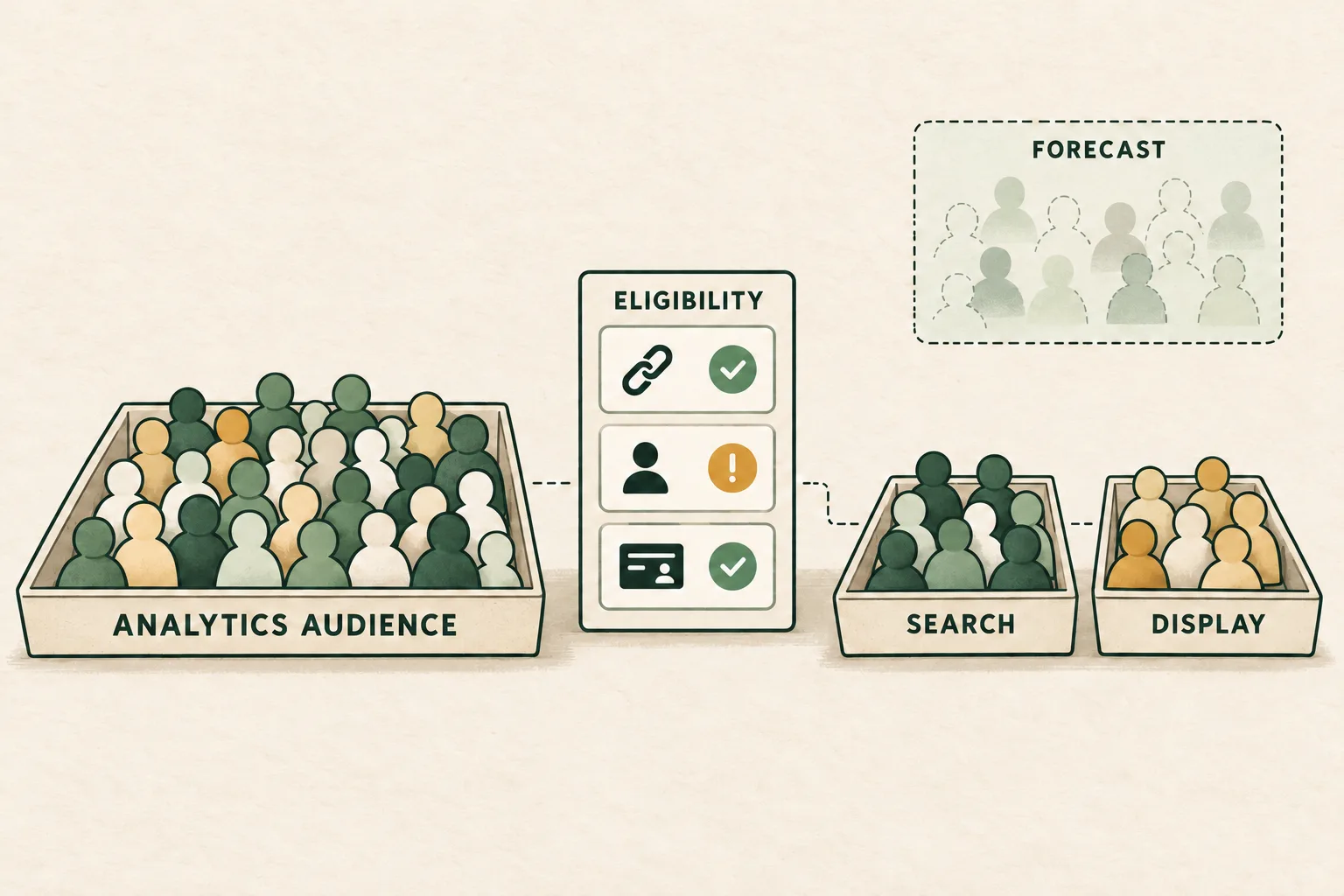
A large GA4 audience does not prove that the same number of people are eligible for Google Ads remarketing. Start by identifying the displayed population: Analytics reporting users, an audience-builder estimate, a forecast of future advertising eligibility, or an actual network-specific advertising list. Then check the receiving account, collection source, consent configuration, membership timing and campaign use.
Google explicitly distinguishes users meeting Analytics audience criteria from the subset eligible for advertising. Do not treat the difference as a count of lost visitors, bots or missing sales. Audience-size differences reference.
Three real questions illustrate the task. One advertiser reports one linked GA4 property's audience populating while another remains empty. Another sees an audience in Ads Manager but a zero, too-small-to-serve count. A third has different list sizes across networks but no campaign impressions. These older discussions establish practical questions; their suggested toggles, thresholds and bidding changes are not a current diagnosis of your account.
Step 1: name the number before calculating a gap#
Save the property, audience identifier, receiving Ads account, exact screen, network, observation time and selected dates. Screens with the same audience name can describe different populations.
| Surface | What to establish | What it does not prove |
|---|---|---|
| Analytics audience report | User metric and selected reporting period | Current advertising eligibility for every user |
| Audience-builder summary | Criteria and estimation window | A fully populated exported list |
| Advertising-size forecast | Predicted range, network and future horizon | Today's actual membership |
| Advertising segment or Ads Audience Manager | Current network-specific list size and status | That a campaign will deliver |
| Campaign report | Actual targeting configuration and impressions | That all impressions came from a particular list |
Google's audience-management reference notes that the detailed audience report counts users active in the selected period rather than simply displaying total membership. Preserve that distinction when somebody compares a monthly report with today's list. Audience management reference.
A useful incident statement is precise: “At the same observation time, audience X has this selected-period Analytics user count and this Search list status in account Y.” “GA4 has thousands but Google has zero” omits most of the evidence needed to choose the next check.
Trace the audience through each eligibility gate
Record the population, destination and consent checks before comparing list sizes.
Use the tracking QA checklistOpens a practical guide. No email required.
Step 2: compare actual advertising surfaces before using a forecast#
The Advertising segments panel in Analytics exposes ads-personalization-eligible sizes intended to correspond to Ads Audience Manager. Start there for a closer comparison, keeping the receiving account and network consistent. Advertising segments reference.
Separately, Google's audience-builder forecasting feature predicts list size 30 days ahead. The documented range is a 60% confidence interval. A green forecast indicator describes expected future sufficiency; it is not a receipt that the list is eligible today. A missing prediction can reflect linking, readiness or insufficient prediction confidence rather than an observed zero. List-size estimates reference.
Keep a screenshot of the range and its label together. Copying only the lower number into a spreadsheet can turn a forecast into a supposed observed count. Similarly, comparing a new list's current size with a forecast for a later date does not measure how many users failed to sync.
If the two actual advertising surfaces disagree, record both snapshots and their update timing before changing the audience. If both show the same small count, the next task is eligibility and source investigation, not report-label repair.
Step 3: verify the property, destination and collection source#
Inspect the actual Google Ads link for the property supplying the audience. Preserve the selected receiving account and the personalization controls visible in that configuration. A second property's successful export does not validate this property's connection.
Google's population troubleshooting also directs users to the Analytics/Firebase audience-source card in Ads and to the events supplying the definition. Check whether the expected page or event is being received under the intended source. An audience with no qualifying activity cannot grow solely because its destination exists. Audience population troubleshooting.
Use an authorized test journey to inspect collection. Record the actual event name, condition values, destination and privacy state. Do not repeatedly submit real transactions or generate paid ad interactions to make a list grow. One successful event is implementation evidence, not proof of a person's downstream remarketing membership.
For conditions that depend on a custom field, inspect whether that field is actually collected and usable in the selected scope. For authenticated identity, the User-ID implementation and reporting guide covers login, logout and account switching. A valid account identifier alone does not certify advertising eligibility.
Step 4: review consent controls using current guidance#
A person may qualify for Analytics measurement while not being available for ads personalization. Check the actual permitted consent branches and the implemented advertising controls. Do not change a visitor's choice to make two counts agree.
There is a material documentation conflict to recognize. Google's population troubleshooting still describes Google Signals as a requirement for remarketing. Its dated Data Controls update, however, announces a transition starting 15 June 2026: Ads Consent Mode governs collection and use of Google Ads cookies and identifiers, while Google Signals controls association with signed-in information for Analytics behavioral reporting.
Do not convert an older “turn Signals on” forum reply into a universal repair. Read the dated update alongside the configuration actually available for your property and the intended collection method. If your implementation does not fit the documented behavior, preserve the discrepancy for support instead of silently choosing whichever page promises the larger list.
The same update describes further personalization-control consolidation later in 2026 without supplying completion dates for every change. This guide does not assume that every property already presents identical controls. Google's advanced personalization settings reference still describes link-level and regional controls, including cases where Analytics measurement remains available while advertising use is restricted.
Record which control applies, where it is configured and when its state changed. A configuration screenshot taken today does not establish what applied when older members were collected. For modeled reporting, use the Consent Mode modeling eligibility guide; aggregate modeled activity is not a list of individually eligible remarketing users.
Step 5: separate membership duration, activity and processing#
These are different clocks. Membership duration describes how long a person remains in the defined segment. A reporting date range selects activity for a report. Network activity requirements affect advertising eligibility. Processing controls when the relevant surface updates.
Google's size-differences documentation gives Search as an example: the person must have used Google Search in the preceding 30 days, independently of when the Analytics criteria were met. The same documentation distinguishes advertising identifiers from Analytics reporting identifiers. Network and identity requirements.
Do not assume that a 180-day audience definition establishes 180 days of active eligibility on every network. Nor should changing an attribution window be presented as a repair for audience collection: advertising conversion credit and audience membership are different tasks.
Preserve audience creation time, definition version, link activation and membership settings. Analytics documentation describes accumulation from creation and up to 30 days of prepopulation for eligible Ads audiences when the data is available. A builder's retrospective estimate is therefore not a promise that every historical measurement user will appear in Ads. Creation and export timing.
Set a named recheck time after a verified implementation or configuration change. Processing guidance is not permission to ignore an old, reproducible defect indefinitely. A fresh observation should use the same source, network and report definition as the earlier snapshot.
Step 6: check the current network requirement, then campaign use#
As reviewed on 31 October 2026, Google's data-segment reference lists a minimum of 100 active visitors or users in the last 30 days for Display, Search and YouTube. Its customer-list note separately distinguishes lists uploaded or refreshed after 1 February 2024 from older uploads. Do not apply an old universal 1,000-user reply to every current Analytics audience. Current data-segment requirements.
Inspect the current list type, status and target network in your account. Meeting a minimum is one eligibility check, not a delivery guarantee. If the list is sufficient but impressions remain zero, move to the eligible-but-zero-impressions diagnostic with the audience evidence attached. That next investigation should preserve policy, campaign and configuration status rather than prescribing a budget change from a list-size screenshot.
Also inspect how the audience is used. Google's Targeting and Observation settings have different reach effects; Observation does not narrow reach to the selected audience. Campaign delivery therefore cannot, by itself, prove membership or exclusive remarketing. Targeting and Observation reference.
If you need to stop delivery to users who completed one particular outcome, validate a conversion-specific audience exclusion separately from list size and readiness.
Keep the finding narrow: “the list meets the documented minimum,” “the campaign uses it for observation,” or “the source has no qualifying events.” Those statements lead to different actions.
A hypothetical worksheet without inventing lost users#
Suppose a team captures these observations for one named audience. All figures are hypothetical, not customer results.
| Observation | Saved value | Interpretation |
|---|---|---|
| Analytics audience report | 1,800 users in its selected period | Measurement reporting population |
| Advertising Search list | 240 at the observation time | Search-specific advertising size |
| Advertising Display list | 120 at the observation time | Display-specific advertising size |
| Search builder forecast | Range of 300–500 after 30 days | Future estimate, not current membership |
| Campaign report | Zero impressions | Delivery finding needing its own scope |
The quotient 240 ÷ 1,800 is about 13.3%. It is not a demonstrated collection or sync success rate: the numerator and denominator describe different eligibility and time boundaries. Calling the remaining 86.7% “lost users” would invent a joined population.
Similarly, 240 + 120 = 360 adds two network counts, not 360 unique people. Without compatible overlap evidence, do not turn their sum into a combined audience. The same person can be eligible on more than one network.
The useful next steps are to compare the actual advertising surfaces, confirm the destination and source events, review the applicable controls, and inspect how the campaign uses the list. A 300–500 forecast cannot explain today's zero impressions. Neither a forecast nor a total-user report identifies the cause of the difference.
An incident worksheet should have an unresolved column. If a privacy or identifier limitation cannot be quantified, label it unknown. Do not divide the residual among consent, browser blocking and inactivity using industry percentages or a forum estimate.
Close the issue with separate completion evidence#
Preserve the initial configuration and report snapshots. After a reviewed repair, repeat the same collection test and observe the same destination list. Save the implementation result, subsequent advertising-list state and campaign delivery as separate receipts.
Escalate with a bounded question: “Which documented eligibility or export condition remains unmet for this audience in this account and network?” Include creation and observation times, source-card evidence, the current definition and the specific documentation conflict where relevant. Redact credentials and personal identifiers from shared traces.
The fashion-retail delivery-quality case study illustrates an independent campaign-delivery baseline. It does not establish audience sync or member matching. For campaigns measured by AdProof, a scoped delivery-report export can accompany your platform and analytics records when the next question concerns actual campaign delivery. Request a measurement review with the campaign, dates and the delivery discrepancy to investigate; audience controls remain with the relevant platforms and implementation owners.
Frequently asked questions#
Why can GA4 show users while Google Ads shows zero?
Analytics measurement, export eligibility and network availability are different checks. Compare the actual advertising segment with the matching Ads account and network, then inspect the source, applicable controls and timing. Do not infer one root cause from the headline gap.
Does a green audience forecast mean the list can serve now?
No. It describes a prediction for a future horizon. Preserve the range and network, then check the current list status separately. A forecast is not evidence of today's membership or campaign delivery.
Should I turn Google Signals on to fix every empty list?
No universal toggle follows from this symptom. Current Google troubleshooting and its dated 2026 Data Controls update contain different descriptions of the controls. Verify the supported configuration, actual consent behavior and relevant update before proposing a reviewed change.
Can I add Search and Display list sizes to reach a minimum?
Their sum does not establish a count of distinct people or eligibility for a particular network. Inspect the network-specific list and current requirement instead. A sufficiently sized list also does not prove the campaign is configured to serve exclusively to it.
Trace the audience through each eligibility gate
Record the population, destination and consent checks before comparing list sizes.
Use the tracking QA checklistOpens a practical guide. No email required.