
- Published
- Nov 1, 2026
- Reading time
- 11 min read
GAM Key-Value Targeting: Eligibility Is Not Exclusivity
Diagnose GAM key-value targeting with request evidence, page and slot overrides, saved rules and delivery diagnostics before changing competition settings.
In this guide (10 sections)
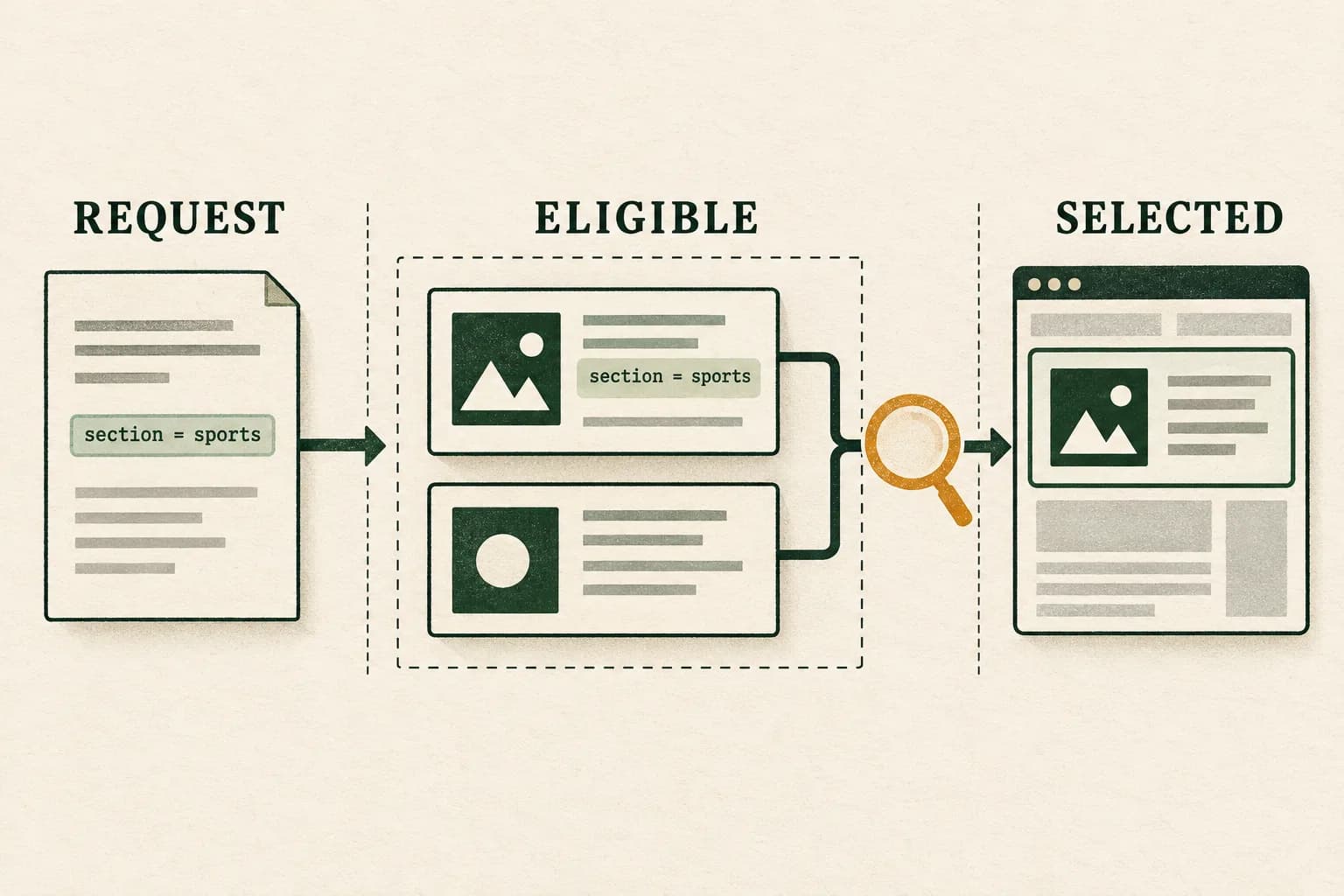
A correct key-value pair can make a Google Ad Manager line item eligible without reserving that request for it. Separate three questions: what targeting reached the server, which candidates matched their complete rules, and why one candidate was selected. Seeing another advertisement does not, by itself, prove that custom targeting was ignored.
Start with one captured request and the actual delivered line-item and creative IDs. Compare its effective page and slot targeting with the saved line-item rules. Then investigate competition and other eligibility conditions. Do not begin by raising priorities, excluding large inventory groups or repeatedly refreshing production ads.
Two real questions that need different evidence#
An August 2025 publisher discussion reports banners appearing against unexpected content keys. Replies propose configuration and competition explanations, but do not demonstrate the cause with a complete request trace.
A July 2021 targeting question is more specific: the author sees the expected request keys, yet the desired line item loses to similar-priority competitors. A follow-up says those competitors have no specific custom-targeting restriction. That is an eligibility-versus-selection misunderstanding, not evidence that a matching key should override the rest of ad selection.
Both are archived evergreen discussions. Their age is explicit; neither establishes a fresh outage or a universally correct repair. The diagnostic below addresses the shared implementation task without declaring either publisher's configuration independently audited.
Separate eligibility from exclusive delivery
A key-value match can make a line item eligible without guaranteeing its selection. Discuss what the request and selection evidence can show.
Discuss geo measurementA short inquiry to scope relevant options; no campaign access is needed.
1. Freeze the exact request, not just the page URL#
Choose an authorized test page or a bounded observation approved by the inventory owner. Record the release version, timestamp and timezone, network code, ad-unit path, slot/container, requested size and relevant consent state. Keep the request sequence identifiable when the page contains multiple slots or later replacements.
Use the Google Publisher Console to inspect the slot. It exposes effective targeting, returned line-item and creative identifiers, and fetch information. The documented googletag.openConsole() command opens that diagnostic interface on a GPT page; it is not an instruction to click the ad or create another request.
Save the relevant request evidence beside the console observation. A screenshot taken after several later cycles cannot establish the targeting on the original request. Likewise, an attractive banner is not a reliable identifier: the same artwork can be associated with different trafficking records.
Write the intended result as a checkable requirement. “This creative must appear only on sports content” differs from “this line item should win every sports request.” The first is a restriction; the second is an allocation objective requiring its own trafficking design.
2. Compare the effective page and slot configuration#
Google's current GPT targeting guide documents page configuration through googletag.setConfig() and slot configuration through slot.setConfig(). Different keys combine, while a slot-level value takes precedence when the same key is defined at both levels.
For example, suppose the page default is section=travel, but one slot overrides it with section=sports. Inspect the effective request for that slot rather than using the page default as proof that travel targeting was sent. A second slot can have a different effective result on the same page.
Targeting also persists for the life of the slot until changed or cleared. A route transition that updates visible content does not itself establish that the outgoing targeting changed. Record when the relevant configuration was applied relative to the request.
Avoid diagnosing this by adding another sender or refresh callback. The lazy-auction and GPT timing guide owns the detailed request-scheduling investigation. Here, retain the effective content keys for the specific slot and cycle before interpreting the line-item decision.
3. Check names, value structure and the actual matching rule#
Preserve the configured key name, value name, complete value array and targeting operator. Compare the actual strings and their intended business meaning before proposing a normalization change.
Google's valid-entry documentation says key and value names are not case-sensitive. It also distinguishes allowed characters and spaces, and treats numeric values as strings rather than arithmetic quantities. Do not adopt a forum's universal “uppercase breaks GAM” diagnosis. Still retain exact values: punctuation, encoding, display names and an application's own field handling need separate checks.
Use the target-key-values reference for the saved match type. Exact, prefix and include matching are different rules; the documented match types apply to dynamic keys, not predefined keys. A prefix rule can intentionally cover more content than its short visible label suggests.
Inspect the entire saved predicate, including inclusion, exclusion and any grouping. Where advanced expressions are used, verify the actual key/value names and logical operators. That text-entry feature is documented for Ad Manager 360; do not prescribe it as an interface every network has.
Missing keys deserve their own test. Do not assume that a business category, an absent key and an empty string are interchangeable, or that two broadly described include/exclude configurations exhaust every possible request state.
4. Reopen the saved line item, including preset history#
Check the actual line item associated with the observed result. An order-level note, implementation ticket or saved targeting template is not evidence of the line item's current rule.
Google's targeting-picker documentation distinguishes including and excluding values. It also documents a useful trap: updating or deleting a targeting preset affects future uses, while previously configured items retain the targeting originally applied. A corrected preset can therefore coexist with an unchanged older line item.
Retain the saved rule, its effective change time and the intended business restriction. If a preset changed, compare the affected line item explicitly instead of assuming inheritance. Keep the previous configuration available for review and rollback.
Review other targeting dimensions as well. Google's multiple-conditions guidance explains the distinction between alternatives within a dimension and combined requirements across dimensions. Matching the content key does not remove an independently applicable device or geographic condition.
If creative-level rules exist, inspect them separately. Google's creative-targeting guide says creative and line-item criteria both apply. A correct content condition on the line item cannot make an incompatible creative eligible. Preserve the requested size and actual creative association rather than changing unrelated criteria to make a preview appear.
5. Establish eligibility before explaining the winner#
Google's ad-selection white paper separates matching candidates from subsequent selection. It also describes matching inventory through the ad-unit hierarchy. A broadly eligible line item does not need to name every child unit individually.
The crucial consequence is simple: custom targeting narrows that line item's eligibility. It does not automatically exclude unrestricted competitors from a request carrying the same key. Keep the complete selection context, including line-item type, priority, applicable delivery settings and eligible creative, with the observed outcome.
Use the webpage delivery inspector for the original request. Its delivery details and non-delivery reasons help separate a targeting mismatch from an eligible candidate that lost selection. Preserve the literal reason and the candidate it describes; one candidate's reason does not explain every other candidate.
The targeting comparison in the inspector's Troubleshooting tab does not support every case: placement targeting and custom match types are documented limitations. An absent comparison there cannot certify those rules as correct. Inspect their actual configuration separately.
A simulation is additional evidence, not a replay with identical state. Google says it does not retain page/server state, so frequency, roadblock and competitive-exclusion behavior can differ. Save original and simulated results separately. A desired simulated winner does not prove the original request violated targeting.
6. Use a small acceptance matrix#
Agree expected eligibility before testing. Use an isolated, authorized fixture and change one factor at a time. This suggested matrix is a review worksheet, not a request to generate paid ad traffic.
| Controlled branch | Evidence to retain | Interpretation to avoid |
|---|---|---|
| Expected content value reaches the slot | Request, effective targeting and saved rule | Assuming the matching candidate must win |
| Different value reaches the slot | Complete rule and original candidate diagnostics | Assuming a prefix rule means exact matching |
| Content key is absent | Actual absent state and declared expected behavior | Treating absence as a named category |
| Page default differs from slot value | Both configurations and effective request | Treating the default as the final slot value |
| Preset changed after line-item creation | Preset history and reopened saved line item | Assuming an automatic retroactive update |
| Targeted and unrestricted candidates coexist | Candidate-specific eligibility and selection reason | Calling normal competition a targeting bypass |
If a branch fails, record the first demonstrated mismatch. Avoid changing key generation, line-item rules and priority together: that would leave the successful retest unable to identify which boundary changed.
A hypothetical worksheet: a key is not a delivery guarantee#
Hypothetical example only. Consider 1,000 captured display slot requests carrying section=sports. One specifically targeted line item is being investigated. Assume the following mutually exclusive classifications are fully supported within this invented worksheet:
| Classification | Requests |
|---|---|
| Target line item selected | 400 |
| Another candidate selected while the target was also eligible | 350 |
| Target ineligible because another documented condition failed | 150 |
| Insufficient evidence to classify target eligibility | 100 |
| Total reviewed | 1,000 |
The target was demonstrably eligible on 750 requests: 400 plus 350. It was selected on 400/750, approximately 53.3%, of that verified eligible population. Its selected share of all reviewed requests is 400/1,000, or 40%. These answer different questions.
The 350 competitive outcomes do not establish ignored targeting. The 150 ineligible outcomes need their documented failure categories, and the 100 unknowns must remain visible. Treating all 600 non-selections as targeting defects would merge unlike evidence.
These are request-selection counts, not recorded impressions, people, viewability or payment. They do not estimate lost revenue. A correction should be judged against its intended eligibility requirement and later compatible evidence, not against a demand that this illustrative selection share become 100%.
Keep reporting and the final handoff scoped#
If the apparent contradiction exists only in an aggregate key-value report, inspect its metric and delivered line-item scope. The Prebid/GAM key-value reporting guide explains why a request's key label is not itself proof of that candidate's delivery. Avoid using an aggregate row to overrule a captured request without identifying what each record counts.
Send the implementation owner a compact packet: intended restriction, exact request, effective targeting, saved rule, candidate-specific delivery evidence, controlled test and unresolved branches. Escalate a reproducible contradiction with that packet rather than asserting that every unexpected creative is a platform bug.
For campaigns already measured by AdProof, retain a supported campaign/date/timezone-scoped event or report export beside the separately obtained GAM evidence. Confirm available fields before joining records. AdProof does not configure GAM targeting or expose otherwise unavailable selection decisions.
The anonymized dairy display counting case illustrates a separate delivery-evidence review, not a targeting repair or promised result. Request a scoped measurement review when the downstream delivery population needs reconciliation; use the ad-server discrepancy workflow for that distinct counting task.
Frequently asked questions#
Should a line item win whenever its key-value matches?
No. Matching can establish eligibility when the other criteria also hold. Other eligible candidates and the applicable selection rules still matter. Record the original request and candidate-specific diagnostics before changing allocation settings.
Are GAM key and value names case-sensitive?
Google's valid-entry documentation says they are not. Preserve exact names, values and encoding anyway; an application's field mapping or a different matching condition can still need investigation. Do not assume a casing change alone explains the result.
Does updating a targeting preset update existing line items?
Not automatically. Google's guidance says previously configured items retain the targeting originally applied. Reopen the affected line item and verify its saved rules rather than treating a corrected preset as proof of a deployed correction.
Does a key-value report prove that targeting was ignored?
Not by itself. Establish the metric, request population and delivered line-item scope, then compare them with the original request evidence. A key associated with a reporting row is a different observation from a particular candidate violating its saved targeting rule.
Separate eligibility from exclusive delivery
A key-value match can make a line item eligible without guaranteeing its selection. Discuss what the request and selection evidence can show.
Discuss geo measurementA short inquiry to scope relevant options; no campaign access is needed.