
- Published
- Oct 26, 2026
- Updated
- Nov 10, 2026
- Reading time
- 15 min read
Do Google Ads Click-Fraud Blockers Work? A Practical Evaluation Guide
Evaluate Google Ads click blockers with a test plan for detection, exclusions, false positives, billing credits, and evidence to investigate suspicious clicks.
In this guide (11 sections)
A third-party click-fraud tool can help collect evidence and apply supported controls, but its ability to flag a visit does not prove that it prevented a charge. Before paying for one, establish what it observes, when it acts, which campaigns its controls cover, and how you will distinguish additional protection from activity Google already filtered.
If your campaign is spending unexpectedly fast, investigate the traffic and set an affordable operating plan in parallel. Do not make continued spending depend on a promised credit or treat an average daily budget as a strict daily cap.
A public discussion about suspected click fraud and click blockers captures the practical problem: can software stop unwanted clicks before a small campaign runs out of budget, or does it mainly report activity and block repeat visits? The discussion contains conflicting advice. It establishes the reader's question, not the cause of that account's traffic or a verdict on any vendor.
For Meta campaigns, use the separate Meta click-fraud tool evaluation. Verify Meta’s actual charging basis and supported controls before applying any Google-specific advice.
For Sponsored Products and related Amazon reports, follow the Amazon invalid-click audit; Google controls and credit procedures do not establish Amazon behavior.
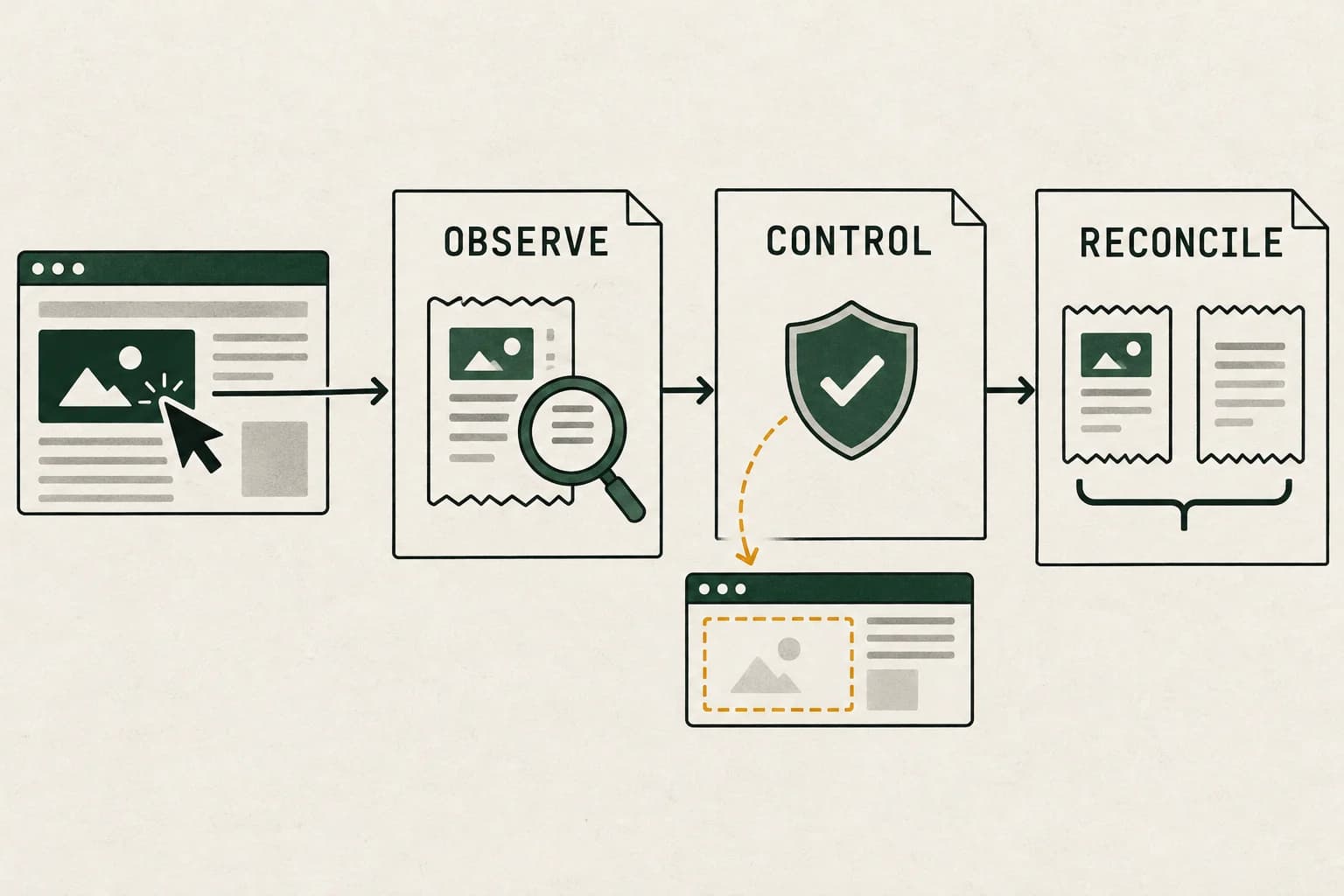
Separate the three jobs hidden inside “click protection”#
A useful evaluation starts with boundaries rather than a dashboard's fraud percentage.
| Job | Evidence of success | What it does not establish |
|---|---|---|
| Observe and classify | A recorded event, its source, classification, and reason | That the event was billed or malicious |
| Change future eligibility | A supported exclusion or other control was accepted and applied at the intended scope | That an earlier click was prevented |
| Reconcile money | A billing adjustment associated with the relevant activity | That every vendor flag produced a credit |
Consider a product that first observes a visit after its landing-page script loads. That observation is downstream of the ad click. It cannot retrospectively prevent that interaction. It might support a later decision, such as excluding an address from future eligible ad delivery, but the later action needs its own evidence.
This is a timing inference, not a claim that every product has the same architecture. Ask each provider to draw its actual observation and enforcement path. “Real time” is not specific enough to show which event happened first.
Know what a click-fraud tool can establish.
Separate a flagged visit from evidence of a prevented charge.
Discuss traffic measurementA measurement discussion, with scope confirmed before any next step.
What Google filters and what a vendor flags are different records#
Google's invalid-traffic guidance distinguishes traffic removed before billing from invalid activity identified after invoicing, for which credits may be issued where appropriate and possible. Its Invalid clicks column describes activity Google has already filtered. A third-party flag can overlap that population.
Keep a vendor's classification in a separate column until you can reconcile it. Do not relabel every flagged landing request as an additional paid invalid click. Requests can include reloads, return visits, and events with missing campaign context.
Google's explanation of differences between its reports and third-party data notes that repeat visits and measurement limitations can produce mismatches without establishing invalid activity. It also says Google does not validate a third party's detection output as part of its investigation. Submit relevant underlying evidence rather than treating a vendor's score as a binding platform decision.
The IVT denominator guide provides a broader framework for reviewing classification coverage and unknowns. Here, keep the buying question narrower: what useful additional action does this particular tool enable?
Define the denominator before quoting an invalid-click rate#
A phrase such as “95% invalid clicks” is not interpretable until the report defines both the numerator and denominator, the date range, and whether its click categories overlap. Google says interactions detected as invalid before billing are removed from campaign metrics and billing; activity discovered after billing can appear later as a credit where appropriate and possible. A vendor's flags, Google's filtered-click count, valid click total, GA4 sessions and invoice adjustments are different populations unless a matched report proves otherwise.
For a simple share calculation, state the exact formula. If a report contains 33 valid clicks and 265 invalid clicks for the same campaign, network, segment and period, and those are mutually exclusive counts that together represent all click attempts in scope, then:
invalid share = invalid clicks / (valid clicks + invalid clicks)
              = 265 / (33 + 265)
              = 88.9% (rounded)
That is only a conditional arithmetic example. It is not a correction to an advertiser's account or a general Google Ads reporting formula. If “33 clicks” already includes or excludes some invalid interactions, or 265 is a different report's filtered count, adding the two may double-count or combine incompatible populations. A reported “95%” may also use another denominator. Do not silently relabel it or infer fraud prevalence from an undefined rate.
Before calculating, export the campaign and network dimensions, date range, reporting timezone, Clicks and Invalid clicks columns, report retrieval time, and the invoice/adjustment period separately. Ask the platform or tool owner what each column counts and whether filtered interactions are already excluded. Keep these outcomes in separate fields: vendor-flagged, platform-filtered, later credited, control applied, and unresolved. A high filtered-click share does not show that the filtered interactions were billed, that they caused any particular outcome, or that the remaining valid clicks were invalid.
If only a small number of valid clicks remain, zero conversions is a small-sample outcome to investigate, not proof that filtering suppressed delivery or that the remaining clicks are fraudulent. Check the search terms, campaign and network scope, landing-page path, conversion definition and tracking separately. For broader platform-to-site count differences, follow the Google Ads clicks versus GA4 sessions diagnostic. For suspicious activity that remains after reconciliation, use Google's invalid-traffic investigation route with a bounded period and relevant records; do not claim a credit before it appears in billing.
Protect cash flow without mistaking a budget setting for a hard cap#
Write down how much additional spending your business can tolerate while you investigate, who can pause the campaign, and when the next review will occur. This is an operating decision under uncertainty, not a calculation of proven fraud loss.
For most campaigns, Google documents a daily billed spending limit of twice the average daily budget and a monthly limit based on 30.4 times that budget. There are exceptions. Review the actual campaign configuration and Google's spending-limit guidance.
Hypothetical example: an unchanged average daily budget of $40 can correspond to an $80 daily billed limit for a campaign subject to the usual two-times rule. Setting $40 does not guarantee the campaign will stop at $40 that day. The ordinary full-month calculation would be $40 × 30.4 = $1,216, subject to the applicable rules and any changes.
There is another important timing detail: Google's budget-change documentation says the day's limit is based on the highest average daily budget selected that day. Lowering the setting after a spike does not reset that day's limit to twice the new lower number. If you cannot tolerate further activity, evaluate pausing with the account owner rather than relying on that assumption.
Record campaign changes before making them. A change log preserves your ability to explain subsequent traffic patterns.
Build a minimal evidence packet before installing another detector#
Start with a bounded incident window and a comparable baseline. Use the account's reporting time zone, retain UTC timestamps where available, and state when each export was retrieved.
A practical packet has five parts:
- Campaign export: stable campaign/ad-group identifiers, dates, network, device, clicks, cost, invalid-click measures, and relevant configuration changes.
- Arrival evidence: permitted server or CDN records showing requested path, time, response status, and campaign identifiers where captured.
- Outcome evidence: qualified leads or orders, including assessment status and measurement gaps. Keep irrelevant personal details out of working exports.
- Control history: the rule, reason, target scope, submission time, confirmation, and any rollback.
- Billing record: invoice or activity adjustments, their service period, and the date they appeared.
Preserve access controls and applicable retention limits. Restrict raw identifiers to the people investigating the issue; they do not belong in public screenshots or forum attachments.
A click can count without a completed website visit, as Google's click definition explains. If the main symptom is fewer sessions than clicks, first use the Google Ads-to-GA4 diagnostic sequence. Broken redirects, blocked tags, or consent-related gaps should not become automatic evidence of an attacker.
Check whether the proposed control actually covers your campaign#
An exclusion list only matters if it is applied through a supported mechanism at the intended level. Ask for the scope and acceptance record, not just the number of addresses a tool added to its own database.
Google's current IP-exclusion documentation distinguishes account-level and campaign-level controls. It lists account-level exclusions across campaign types including Performance Max, while the campaign-level section lists unsupported types including Performance Max, video, and App campaigns. A claim based on one level should not be generalized to the other.
Before authorizing automation, ask:
- Does the product recommend exclusions, submit them, or confirm their application?
- Which account, campaigns, address versions, and settings does the action affect?
- What happens when an action is rejected, unsupported, or delayed?
- How are expired rules reviewed and removed?
- Can you inspect and reverse the changes without depending on a vendor screenshot?
Use the least access needed for the agreed function. A reporting-only evaluation does not automatically require permission to modify campaigns.
IP address and identity are also different concepts. Google notes in its discrepancy guidance that an internet provider can assign one address to multiple people. An actor can also change addresses. Those are failure modes to test, not evidence that a particular campaign was attacked that way. A repeat-address rule needs a review process for legitimate activity; an address that changes cannot be assumed to preserve the same identity.
If geography is the concern, investigate campaign location settings and observed location evidence separately with the location-verification guide.
If unusual clicks appear outside the target area#
A recent Google Ads Community question about suspected invalid clicks outside a targeted location illustrates why two labels should not be collapsed. The poster described an unusual click pattern and called it malicious; the available thread text does not independently verify the clicks, their source, whether they were charged, or the precise location-report field. Product Expert replies recommended both changing location targeting and checking invalid-click reporting. Treat those as checks, not a diagnosis.
Start with the Google Ads campaign's Invalid clicks and, where available, Invalid interactions columns for the same campaign and date range. Google's documentation says these values represent interactions its systems already classified and filtered from campaign metrics; those filtered clicks are not charged. They do not tell you how many additional clicks a third-party tool flags, and a low or zero column is not proof that a location mismatch is malicious. Later-detected activity and credits are a separate billing record; compare the Invalid Activity Credit Report and billing period rather than translating a click count into savings.
Then check the campaign's actual location option and report field. Google describes location targeting as best effort from multiple signals, with no guarantee of 100% accuracy. Presence, presence-or-interest, click location, website-session location and a verifier's IP-derived location are different observations. If the business rule requires physical presence, confirm which presence option the campaign used during the interval and whether the report is showing user location or another geographic dimension. Do not exclude a city solely because a small set of clicks or calls resolves there.
Use a short, consistent comparison window and preserve: campaign and network, account time zone, clicks and cost, invalid-click columns, the geographic field definition, the targeting configuration and its change history, plus permitted landing-request evidence. If the remaining evidence suggests possible invalid traffic that was not filtered, Google's invalid-traffic guidance links to an investigation request for activity within the previous 60 days. A request is a review path, not confirmation that the activity was invalid or that a credit will be issued.
For a location-settings question, continue with the location-verification workflow. For the separate question of how to test a third-party blocker, return to the evaluation plan below. Neither a geo mismatch nor a vendor label proves billable waste, competitor activity, or a recoverable amount.
Evaluate a tool with a written test, not a promised savings number#
Use an authorized, reversible pilot. Choose success measures before looking at the results, and keep a comparison period with similar campaign scope. Do not deliberately click live ads or generate invalid activity to test detection.
| Evaluation question | What to inspect | A reason to withhold a conclusion |
|---|---|---|
| What did the tool observe? | Event source, timestamps, eligible population, missing records | Only a percentage or IP count is supplied |
| Why was it flagged? | Inspectable reason and supporting event pattern | “AI detected it” is the only explanation |
| Did a control execute? | Acceptance record and intended account/campaign scope | A recommendation is reported as an applied block |
| Was legitimate activity affected? | Reviewed examples, qualified outcomes, reversible rules | Every non-converting visitor is labeled invalid |
| Did the business benefit? | Comparable outcome and cost records, adjusted for known changes | A before/after change is attributed entirely to the tool |
Begin with observation if the provider supports it. Review a sample of flagged and unflagged records before enabling changes. Observation alone cannot prove detection accuracy, but it can reveal unusable evidence or rules that clearly include normal customer behavior.
Keep an honest unknown category. You will rarely know the validity of every click, and Google does not provide a public click-by-click verdict to settle every third-party disagreement. A fall in flags may reflect different traffic, weaker coverage, or fewer events reaching the detector.
Work through one savings claim without double-counting it#
The following example is entirely hypothetical. It illustrates an audit, not vendor effectiveness or an AdProof customer result.
A tool reports 80 flagged records and multiplies them by an assumed $5 cost to claim $400 saved. Reviewing its records reveals 30 repeated landing requests without evidence of a new ad click, leaving 50 candidate click records. A platform report shows 20 filtered clicks in the same campaign window; a later report shows 10 credited clicks.
You can verify the first calculation: 80 − 30 = 50 candidates. You cannot safely conclude that 50 − 20 − 10 = 20 additional paid invalid clicks. The aggregate reports do not establish which populations overlap. Their click records, counting stages, or credit periods may differ. The $5 multiplier also does not prove actual billed cost. Without the missing reconciliation, $400 remains an unsupported estimate of additional protection.
Maintain separate labels: flagged, platform-filtered, credited, control-applied, and unresolved. For commercial evaluation, document the incremental benefit you can substantiate and the cost of the service. Do not simply subtract every reported credit from a vendor estimate: establish the populations and their overlap first.
Google notes that campaign reporting and billing pages can differ because of adjustments. Reconcile with the applicable billing records rather than assuming a campaign-cost screenshot is the final amount payable.
Escalate an unresolved incident with evidence, not an accusation#
Google's investigation guidance covers activity within the previous 60 days and requests account, date-range, campaign/ad-group, keyword, and relevant server evidence, including click identifiers where available. Follow the current Click Quality Form linked from its invalid-traffic help page. Do not assume a fixed outcome or immediate response.
Describe the pattern, the ordinary explanations already checked, and the affected scope. Ask which additional information the reviewer needs. An unusual network, a burst of clicks, or poor leads alone does not establish that a named competitor was responsible.
For eligible reporting, Google's Invalid Activity Credit Report provides campaign/network credit details and adjusted metrics for Search and Performance Max. Keep credited amounts distinct from the Invalid clicks column. Save the associated reporting period as well as the posting date so late adjustments do not disappear into the wrong month.
Before attributing a spend spike to invalid clicks, check the applicable budget and billed-cost limits, including same-day edits and the campaign budget type.
Frequently asked questions#
Does a click blocker stop the first suspicious click?
That depends on where enforcement occurs. A tool that begins observing at the landing page cannot use that new observation to prevent the earlier click. Ask for a documented earlier control if the provider claims first-interaction prevention.
Does a high invalid-click count mean I paid for all of those clicks?
No. A count of platform-filtered activity and an amount of additional disputed spend are different measures. Reconcile the service period, metric definitions, adjustments, and actual billed cost before calculating an amount.
Should I block every repeated IP address?
No blanket rule follows from repetition alone. Review the event pattern, shared-network possibilities, genuine outcomes, rule scope, and reversibility. Treat the address as one signal rather than a person's verified identity.
Is a lower conversion rate proof of click fraud?
No. It is a reason to investigate, alongside targeting changes, lead assessment, landing-page failures, and missing measurement. Keep a hypothesis separate from a confirmed classification.
How can AdProof help with the investigation?
Use AdProof to structure a delivery-measurement review around defined events, recorded exclusions, dates, and comparable counts. Its anonymized FMCG measurement example shows a measured gross-to-net finding, not a Google Ads credit or click-blocking guarantee. Discuss your measurement scope with AdProof before assuming a particular integration or control is covered.
Know what a click-fraud tool can establish.
Separate a flagged visit from evidence of a prevented charge.
Discuss traffic measurementA measurement discussion, with scope confirmed before any next step.