
- Published
- Nov 1, 2026
- Reading time
- 11 min read
IMA Ads Won’t Autoplay: Trace Permission, Mute and Playback
Diagnose HTML5 IMA autoplay failures with browser playback evidence, truthful mute declarations, iframe checks and a supported user-initiated fallback.
In this guide (10 sections)
When an IMA video ad will not autoplay, separate browser playback permission, the player's actual sound state and the mode declared in the ad request. A successful ad response does not establish that the browser allowed playback. Setting an autoplay flag does not make a blocked media element play.
Capture the first failed transition, then follow the supported branch: audible autoplay, muted autoplay or an explicit play-button fallback. Retest the ad itself after checking the content player. Permission evidence from one element is useful, but it is not an impression receipt for another.
Older questions reveal three different implementation gaps#
An older Stack Overflow question about mobile Chrome and iOS autoplay includes an autoplay declaration alongside playback trouble. A separate question asks how to start HTML5 IMA ads muted after a muted content video works but its ad starts with sound.
A public IMA support discussion about Safari and iPhone adds another distinction: the poster clicks play, yet the ad does not start. Support recommends moving container initialization into the user action. The poster reports improvement on desktop Safari but continued iPhone trouble; a later participant reports a similar symptom. The opened discussion does not establish one universal fix.
These are evergreen implementation questions, not evidence of a new browser incident. This guide checks their underlying tasks against official documentation available on 1 November 2026. Its scope is HTML5 client-side IMA; native Android adapters, stitched streams and plugin-managed integrations have additional contracts.
Trace the first blocked playback step
Record browser permission, actual sound state and the request declaration.
Use the tracking QA checklistOpens a practical guide. No email required.
1. Freeze the failing playback context#
Record the browser and operating-system versions, player build, IMA loading path, page origin and whether playback occurs in an embedded frame. Include the intended experience: start automatically with sound, start muted, or wait for a voluntary action.
Preserve the actual test conditions. A frequently used developer profile can behave differently from a first visit. An embedded publisher page can differ from the standalone demo. Testing a new browser, creative and player bundle together cannot identify which boundary changed.
For one authorized attempt, record:
| Boundary | Evidence to keep |
|---|---|
| Browser media attempt | Correct element, play call and returned result |
| Sound state | Muted property, effective volume and any subsequent change |
| Request declaration | Autoplay and mute values supplied for this request |
| IMA initialization | Container, manager and initiating action |
| Actual ad playback | SDK event, observed media and resulting controls |
| Reporting | Relevant outgoing request and recipient record, if available |
Use internal test identifiers and elapsed milliseconds for ordering. Retain wall-clock time and timezone for correlation with server records. Remove signed URLs, personal data and unrelated page contents from a shared diagnostic packet.
2. Read the playback result before labeling the failure#
MDN's media play reference describes a promise that resolves when playback has started and rejects when it cannot start. Preserve the rejection name and context. A permission-related NotAllowedError and an unsupported-source NotSupportedError lead to different investigations.
Calling play() in JavaScript does not escape autoplay policy. Nor should the interface switch to a pause state merely because the function was called. Wait for the supported result, and retain a usable start control when automatic playback is unavailable.
Treat an unresolved result separately from a rejection. Permission handling can introduce a delay. A generic timer that declares every slow attempt blocked can turn an uncertain state into a false diagnosis.
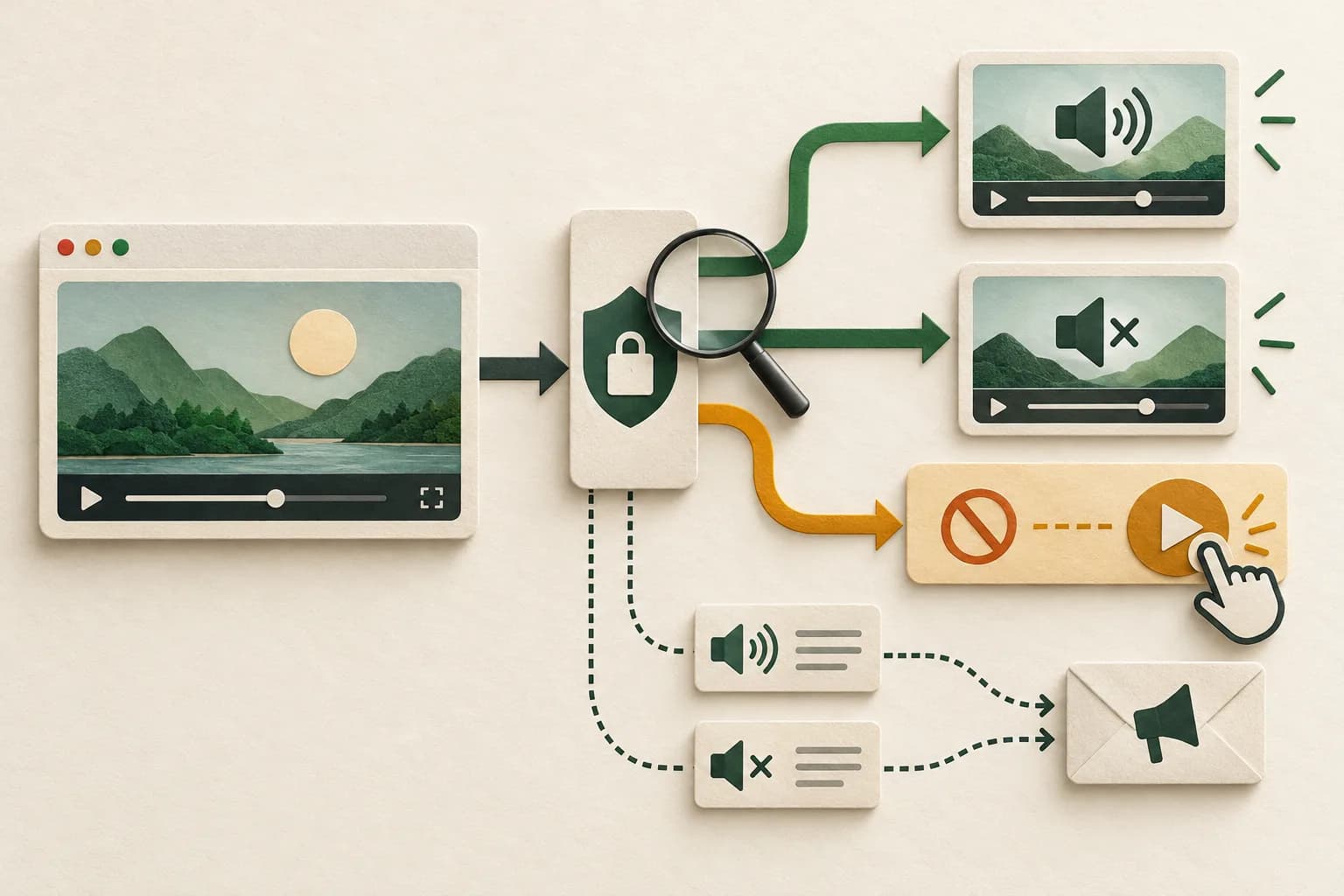
Google's IMA autoplay guide uses the content video to test playback capability. Its flow distinguishes audible success, muted-only success and failure requiring click-to-play. Apply the branch appropriate to the intended experience; do not surprise users with sound merely to collect a diagnostic result.
A probe establishes what happened to that element under those conditions. Continue tracing the selected ad through its own initialization, sound state and playback. It can still fail for another reason.
3. Keep request declarations separate from playback controls#
The current AdsRequest API is explicit: changing setAdWillAutoPlay or setAdWillPlayMuted does not itself change ad playback. These methods communicate the intended behavior. The mute declaration also signals muted inventory in the request.
Use the observed capability and intended startup mode to set truthful values before sending the request. Do not set a flag to whichever value happens to return an ad while leaving the actual experience different.
| Intended, supported branch | Request declaration | Separate runtime check |
|---|---|---|
| Automatic start with sound | Autoplay true; muted false | Actual ad starts under permitted conditions with the intended sound state |
| Automatic start muted | Autoplay true; muted true | Actual ad is muted before its supported startup path |
| User-initiated start | Autoplay false; mute value matches intended start | Real control action reaches initialization and playback |
The click branch can intentionally start muted or with sound. It is not a universal instruction to declare every clicked ad unmuted. Keep product choices and declarations aligned.
Likewise, a muted content element does not prove the ad manager received the same volume state. Check which object each setting controls and whether another callback changes it before playback begins.
For a native mobile app using AdMob, audit the app, SDK, format and returned source audio contract rather than copying HTML5 IMA volume controls.
4. Verify the actual ad volume and initialization sequence#
The HTML5 AdsManager reference exposes a separate volume control, with zero representing muted. Its startup method also requires container initialization first. Inspect the manager associated with this attempt, not a stale instance retained from an earlier request.
Google's official attempt-to-autoplay sample applies the selected ad volume after obtaining the manager and before its startup path. That is a useful implementation comparison for direct IMA. It is not permission to paste competing controls over a player plugin that already owns initialization and volume.
For a click fallback, the AdDisplayContainer contract requires initialization directly from the user action. The same reference documents a muted-playback allowance in supporting browsers; this is consistent with checking the actual autoplay branch rather than assuming every environment requires an identical sequence.
Trace the real handler. Was initialization called on page load, in the actual click, or only after an unrelated asynchronous callback? A button visible on screen does not establish that its handler performed the required operation. Compare the supported sample with the deployed integration and repeat the affected branch.
Keep the fallback voluntary and identifiable. A programmatic event or a click on an advertisement is not the same product interaction as a play control. Do not simulate engagement or require advertising interaction to make an engineering test appear successful.
5. Inspect the embedding boundary and browser-specific behavior#
Chrome's autoplay policy guidance describes different conditions for sound and muted playback, including prior interaction and desktop media engagement. It also documents permission delegation to cross-origin frames. This explains why one developer profile or a standalone page can succeed while an embedded deployment fails.
Check the actual frame tree and effective autoplay permission with the embedding owner. Where applicable, inspect the containing frame's allow policy and the document's response policy. An allowed feature is not a promise that every asset or sound state will play. A restriction elsewhere in the embedding chain still needs investigation.
The Permissions-Policy autoplay reference also warns about compatibility. Verify support in the affected browser instead of treating one header recipe as universal. Change only an authorized, demonstrated embedding configuration; do not disable browser protections or modify SDK-owned frames to force playback.
For Safari, WebKit's macOS policy guidance explains why silent audio tracks, per-element permission and user preferences matter. Its publication is historical policy context, not a guarantee for every current Safari build. Test the actual version and settings.
For iPhone inline playback, Google's autoplay guide specifies playsinline on the video element. That attribute describes inline presentation; it does not independently grant sound permission or validate a creative. Retain separate tests for start, inline display, controls and unmuting.
6. Use an acceptance matrix that includes the fallback#
Test a known supported integration and the affected build with an authorized response. Observe actual playback, not only successful network requests. Include the smallest branches that reproduce the difference:
| Test condition | Acceptance evidence |
|---|---|
| Intended automatic playback is allowed | Correct start and truthful request mode |
| Only muted automatic playback succeeds | Correct ad mute state and a usable voluntary sound control |
| Automatic playback is unavailable | Visible, accessible play control starts the supported flow |
| Player is embedded | Effective permission and actual playback agree in the real frame tree |
| User changes sound state | Supported interaction works without hiding an unexpected pause |
| Ad fails for a separate loading reason | Error remains distinct from permission rejection; documented content fallback remains usable |
Do not count fallback as a defect merely because autoplay was unavailable. A successfully handled restriction can be the correct result. Conversely, a spinner that never offers a usable start control is not successful fallback.
Record the exact asset and response used for each attempt. A different ad decision on repetition can change which media behavior is exercised. If the media itself fails, continue with the VAST errors and timeouts diagnostic, preserving the permission evidence already collected.
A hypothetical review of thirty authorized attempts#
Hypothetical example only. A team assigns each attempt one final initial-test classification:
| Observed result | Attempts |
|---|---|
| Automatic ad playback with sound verified | 8 |
| Automatic muted ad playback verified | 10 |
| Automatic path unavailable; voluntary fallback then starts the ad | 7 |
| Permission rejection observed; fallback does not achieve a start | 3 |
| Separate unsupported-media failure | 1 |
| Trace incomplete | 1 |
| Total | 30 |
Automatic playback is verified in 18/30 = 60% of attempts. Playback through either the automatic or verified fallback path is 25/30, approximately 83.3%. Reporting only the first ratio would hide seven working fallback experiences. Reporting the second as an autoplay rate would mislabel them.
The three failed fallback attempts need their own traces. The unsupported-media attempt belongs to another failure boundary, and the incomplete trace remains unknown. None of these figures is an industry benchmark, a paid-impression discrepancy, a bot rate or proof of lost revenue.
Suppose a correction makes the three fallback controls work in a repeated test. That supports the tested interaction under those conditions. It does not reconstruct past playback or establish how many campaign impressions were billed, visible or attentive.
Close playback acceptance and reporting reconciliation separately#
The IMA ad-event reference distinguishes available ad data, actual start and completion. Its impression event describes an impression URL being pinged. Keep those observations separate from a receiving system's accepted record and from viewability.
Send the implementation owner the first unexplained transition, versions, mode declarations, actual volume, frame context, play result and fallback outcome. If content advances underneath a playing linear ad, use the separate content–ad handoff guide. If playback works but viewability callbacks are missing, use the measurement callback investigation.
For supported campaigns already sending relevant events to AdProof, retain a campaign/date/timezone-scoped export of available delivery and video-stage records beside the player trace. Confirm the relevant event types and filters. Those received records do not reveal an unobserved browser permission decision or imply a native IMA integration.
The anonymized streaming-publisher case provides reconciliation context. Discuss the available evidence with the playback acceptance packet before presenting a later counter increase as complete measurement recovery.
Frequently asked questions#
Does the autoplay request flag make an IMA ad play automatically?
No. The current AdsRequest reference says the setting communicates intended behavior and does not change playback. Browser permission, initialization and actual media startup need separate verification.
Does declaring muted playback actually mute the ad?
No. The declaration is a request signal. Verify the supported player's actual mute or volume control and the manager handling this attempt before its startup path.
Why can the ad fail after the user clicks play?
The visible click does not prove that initialization happened directly in the required handler or that another failure did not occur. Trace the container, manager, playback result and embedding conditions rather than assigning the cause from the button alone.
Does a working content-video probe prove an ad impression?
No. It supplies evidence about that media element under those conditions. Verify the selected ad's startup and relevant tracking separately, then reconcile any receiver record under the same scope.
Trace the first blocked playback step
Record browser permission, actual sound state and the request declaration.
Use the tracking QA checklistOpens a practical guide. No email required.