
- Published
- Oct 31, 2026
- Updated
- Nov 5, 2026
- Reading time
- 15 min read
Video.js and IMA Play Together: Trace the Content–Ad Handoff
Debug content playing beneath IMA ads with a playback timeline, integration ownership checks, fallback tests and evidence that separates requests from results.
In this guide (11 sections)
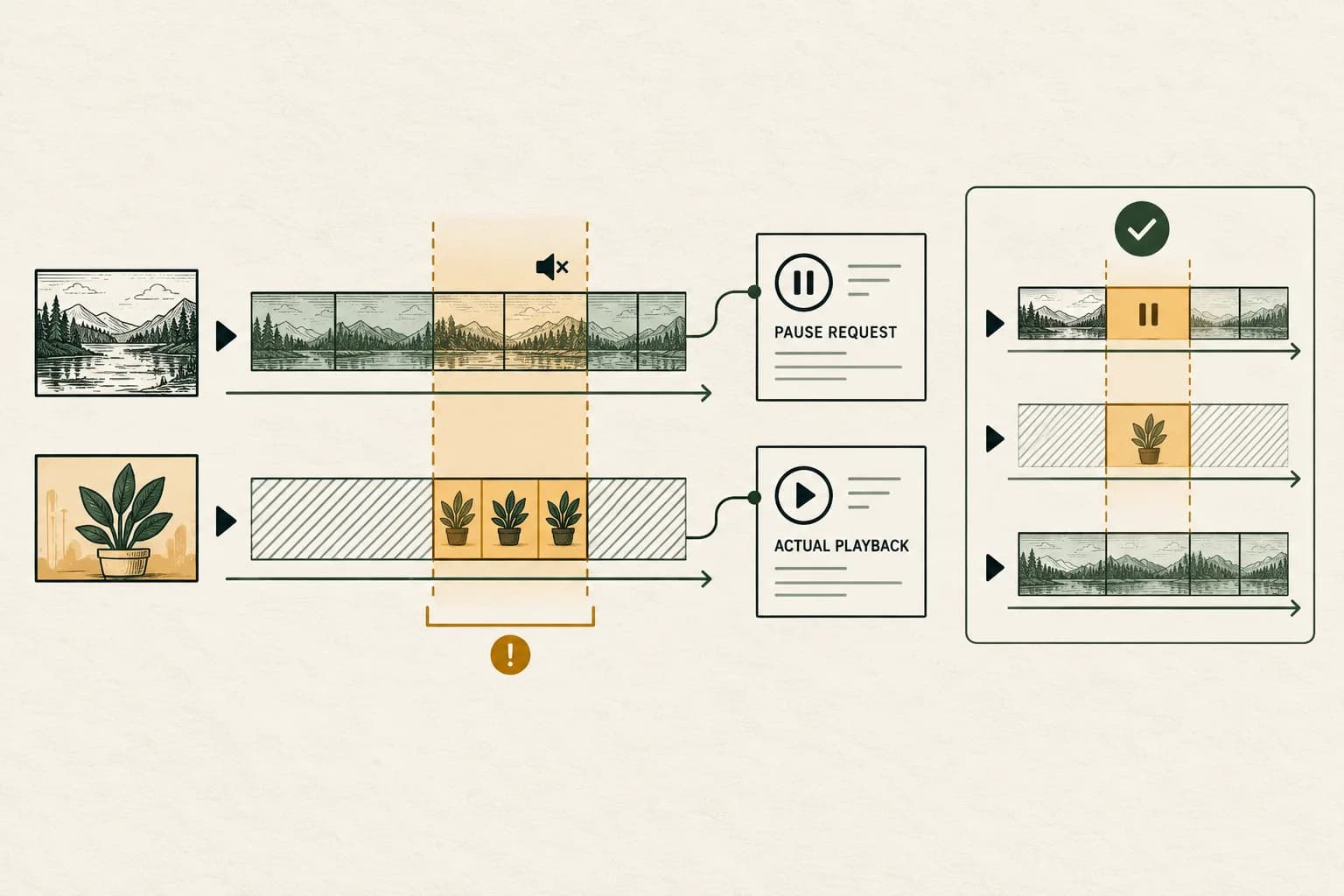
If a linear ad and the program underneath it play together, trace the handoff between the content player, ad integration and application callbacks. Record the actual content playhead alongside the ad events. Calling a pause function once, hiding the content picture or muting its audio does not establish that content stayed stopped throughout the break.
An older Stack Overflow question about Video.js continuing beneath IMA ads describes this symptom with asynchronous fallback logic and intermittent Android reproduction. Its author's later workaround mutes and reloads content. That report is useful provenance, not a production fix to copy into every player.
The linked official plugin issue also matters: a maintainer reported sequential playback in their test in December 2025, and the issue was closed in January 2026. This guide therefore does not claim the historical bug remains present or identify a release that fixed every integration. It provides a current diagnostic method for a similar symptom in your own build.
First establish whether overlap is actually a defect#
Identify the intended ad experience. A linear break that replaces content has a different contract from a non-linear overlay that accompanies it. Google's HTML5 IMA setup guide explicitly distinguishes those cases and assigns content playback control to the integrating application while IMA handles the ad.
Confirm the ad's supported linearity and actual integration before changing behavior. Do not pause program content simply because any advertising interface appeared. This procedure concerns unexpected overlap during a break intended to interrupt content; native apps, stitched streams and other SDKs require their own implementation contracts.
Also distinguish two observations: content audio is audible, or content time advances. A muted underlying video can still consume program time. Conversely, a stalled picture with a spinner does not establish that an ad is playing. Retain screen/audio evidence where permitted, together with the two playback states.
Trace the content and ad handoff
Record the content playhead and ad events together through one break.
Use the tracking QA checklistOpens a practical guide. No email required.
Draw the ownership boundary before adding another callback#
Record the deployed versions of Video.js, its ad integration, any contrib-ads layer, IMA loading path and your application wrapper. Preserve the affected browser, operating system, stream type and build identifier. A successful test using a different media source or plugin bundle is a comparison, not the same reproduction.
Before replacing this stack with another major player generation, audit ad-plugin compatibility and measurement continuity.
The official videojs-ima project supplies the supported plugin integration and separately directs DAI implementations to their own documentation. Establish whether your app uses that plugin, a direct SDK integration or a custom hybrid of both. Avoid assuming a snippet written for direct IMA should be pasted into a plugin-managed flow.
For each operation, name one owner and list any other code that can intervene:
| Responsibility | Evidence to capture |
|---|---|
| Initialize the ad integration | Actual initialization calls and when they run |
| Request a break or fallback ad | Request ID, attempt and initiating callback |
| Pause underlying content | Owning handler and observed content state |
| Control the playing ad | Integration-supported control and resulting ad state |
| Resume or replace content | Resume reason, current source and active break |
| Dispose an old player | Teardown event and remaining callbacks |
This is an engineering inventory, not a recommendation to replace the plugin's state machine. If two layers both resume content, investigate their order before adding a third pause handler.
Capture a time-ordered trace with separate identities#
Assign an internal test ID and a distinct identity to each player instance, content source and ad attempt. Correlate events using a monotonic elapsed time within the trace, while retaining a wall-clock timestamp and timezone for other logs.
Capture the event producer as well as the name. A browser media event, an IMA event, a plugin event and your application log may use similar words while describing different objects. Include the content playhead and paused state at each relevant boundary, plus ad state where the integration exposes it.
The browser's paused property reports that media element's paused state. Pair it with observed time progression and the correct element identity. Reading a different video element, or a wrapper's cached flag, cannot establish what the underlying content was doing.
Useful trace rows include request start, response/error, break entry, pause request, content pause observation, ad start, content play request, content playing observation, break exit and teardown. Record who called play, not merely that a play event occurred. A small sanitized trace usually narrows the problem faster than a large export of unrelated campaign events.
Distinguish requested content changes from ad playback events#
IMA's AdEvent reference gives different meanings to CONTENT_PAUSE_REQUESTED, CONTENT_RESUME_REQUESTED, PAUSED, RESUMED and STARTED. The first pair concerns the content handoff; the other events describe the ad. They are not interchangeable receipts for the program video.
For a direct HTML5 integration, follow the documented content pause/resume handlers. In a plugin integration, first establish what the plugin already handles and which extension points are supported. Keep observer instrumentation separate from code that changes playback.
The AdsManager API separately exposes pause and resume for the ad. Pausing that manager is not evidence that the program video stopped. Nor is resuming the content video proof that an ad safely ended.
Browser playback also has an asynchronous boundary. MDN's play method documentation explains that the returned promise can resolve after playback begins or reject, including when playback is not allowed. Log the result where your integration exposes it. A call in an error handler is an attempted transition, not a guaranteed visible result.
For HTML5 IMA startup, separate autoplay permission from content/ad handoff. A rejected playback attempt needs the actual browser outcome, intended muted mode and user-gesture fallback checked before it is classified as an unintended content resume.
Inspect fallback races without declaring a root cause from code alone#
The original question includes one ad path followed by another after failure, plus callbacks that resume content. That creates a useful test branch: can an earlier attempt's completion or error handler run after a later attempt owns the break? The question alone does not prove that this is the cause in your build.
Trace a concrete sequence. Request A starts; A fails; fallback B begins; a late handler from A requests content playback while B is active. If that order appears in your logs, give each callback a current-attempt and current-player context, then ask the integration owner how stale transitions should be ignored or canceled using supported APIs.
Also inspect repeated listener installation. A handler added on each request may survive longer than intended. Record registrations and removals, request identity and teardown behavior. Do not infer duplicate handlers solely from repeated network requests; those can have other causes.
Change one demonstrated transition at a time. A supported state check or cleanup may be appropriate for your integration, but a generic timeout that pauses everything repeatedly can conceal the race and damage controls. Preserve the original trace so the proposed correction has something falsifiable to explain.
Understand what the plugin's break events prove#
The contrib-ads integrator API distinguishes ad mode, an active break and the content-resuming stage. Its adstart and adend events follow calls entering and leaving linear ad mode. A break can end without an ad actually playing; these are not automatically creative impression or completion counts.
The same reference describes timeout fallback and source-change behavior. A source change restarts the ad workflow, and prior playing state can carry into the new source. Treat that as a branch to test, not proof that every source replacement causes overlap.
Do not copy deprecated contrib-ads events from an old example into a new implementation. Check the deployed plugin contract before using error or cancellation handling. This is particularly important when a workaround reloads the current source: it can change the very workflow being investigated.
For ad-rules integrations, Google's automated-playlist documentation also distinguishes actual content completion from an ad ending when the video element is shared. Keep that boundary in post-roll tests. Do not call content-complete merely because an unrelated media-ended event appeared.
When HLS owns the same element, trace the source handoff#
A newer hls.js integration issue, opened on 9 October 2026, reports a different route to the same unwanted outcome: an HLS recovery operation reclaimed a shared media element after another component selected ad media. A collaborator advised releasing the element while the other library uses it; the author subsequently reported a working controlled integration. Those are scoped maintainer and author observations, not a diagnosis of your player.
The issue was closed through pull request 8085, merged on 20 October. The 1.7.4 release notes, dated 28 October, include the change to detach rather than reset MediaSource when the element has switched to another source. Treat this as a released change worth evaluating against a matching reproduction. Neither a merged change nor a dependency upgrade proves that your application shipped it or passed acceptance.
First establish the actual playback mode. Google's AdsManager reference exposes isCustomPlaybackUsed() for whether the current ad uses a custom video element. Record that result for the affected ad; do not assume it from the browser name. In a plugin-managed setup, ask which supported integration layer owns this handoff before adding application handlers.
Extend the existing timeline with the element identity, selected currentSrc, configured source, HLS attachment state and each recovery, detach and attach operation. Use restricted evidence or stable redacted labels for URLs that contain credentials. Record source changes around the attempted ad start and the content-resume boundary. This proposed trace makes source ownership observable without pretending that every media error has the same cause.
| Observation in the same attempt | Next question for the implementation owner |
|---|---|
| Ad source selected, then a content source replaces it before the intended break ends | Which component changed or recovered the element? |
| Ad play attempt rejects after a new load begins | Does the source timeline explain the interruption, or is permission still unresolved? |
| HLS is detached during custom ad playback | Which supported handler restores the correct content source and position? |
| Content resume targets an obsolete object URL | Can the integration restore the real source through its documented lifecycle? |
| Separate ad and content elements are actually in use | Does this shared-element hypothesis apply at all? |
The hls.js API documents detachMedia and attachMedia as attachment operations. Its recoverMediaError reference describes a detach-and-reattach recovery. These are not interchangeable names for pausing the playhead. A content pause can leave another library attached and able to intervene.
Use one integration owner to evaluate the appropriate supported handoff. Do not paste a second state machine beside a plugin, suppress every media error, or repeatedly assign a source until the picture looks correct. A temporary source-restoration error must be distinguished from a persistent failure; retain its identity and outcome rather than globally treating errors as harmless.
Repeat preroll, midroll and post-roll branches that your integration supports, plus no-ad fallback, navigation and a source change during a pending break. Confirm both the ad interval and the subsequent program position. Record the exact package and application build before and after any candidate change. If the ad asset itself cannot be selected or decoded, return to the VAST media-error investigation; content HLS support does not establish ad-rendition support.
Use a small acceptance matrix that exercises the failing path#
Start with a supported minimal integration and one authorized test response. Compare that with the affected application. Keep a known-good asset and the suspect asset as separate controls; a test that changes the player, creative and network together cannot isolate the difference.
| Test branch | Acceptance observation |
|---|---|
| Linear preroll succeeds | Content stops during the intended break; ad plays; content resumes appropriately |
| First ad path fails and fallback succeeds | Stale callbacks do not restart content beneath the fallback |
| No ad plays or a break times out | Content can continue through the documented fallback without an indefinite stall |
| Midroll and post-roll, where supported | Correct content position and completion boundary are retained |
| User pauses or navigates away | Supported controls and disposal do not leave a second player advancing |
| Source changes during the flow | The new source has its own trace; old callbacks do not control it |
Repeat the intermittent trigger under affected and unaffected browser/device conditions. In the historical issue, early interaction and an HLS content source were relevant to reproduction. They are test dimensions, not a universal diagnosis for Android, Chrome or HLS. For a native Android IMA integration, check preload media identity and custom-player callbacks separately. A browser/plugin workaround is not proof of the native player’s current-ad lifecycle.
Set the acceptance condition before testing. For example: “No observed program-time advancement during this intended linear break, followed by the correct supported resume behavior.” Include audio and navigation checks. A lower complaint count or a successful desktop demonstration is not equivalent to this acceptance evidence.
A hypothetical review of twenty authorized attempts#
Hypothetical example only. A team classifies twenty completed test attempts using the trace and screen observation. Each attempt receives one initial classification:
| Initial observation | Attempts |
|---|---|
| Sequential content–ad handoff verified | 12 |
| Unexpected content advancement during a linear ad | 5 |
| No ad played; documented content fallback verified | 2 |
| Evidence insufficient to classify | 1 |
| Total | 20 |
Observed overlap is 5 / 20 = 25% of all test attempts. Seventeen attempts have an observed ad in this example, so 5 / 17 is approximately 29.4% of those attempts. Those ratios answer different questions. Neither is an industry benchmark, a paid-impression failure rate or a count of affected viewers.
Suppose muting removes the audible overlap in the five cases, but content time still advances. The original acceptance condition remains unmet. A candidate fix needs a repeated trace showing the required state transition, not just a quieter recording.
Keep the unclassified attempt unresolved. Do not silently turn it into a success, missing impression or fraudulent request. A controlled comparison after a correction can support that tested behavior; it does not by itself quantify campaign-wide impact or prove which change caused a later reporting increase.
Close the engineering issue and campaign review separately#
Send the player owner a compact packet: deployed versions, reproduction steps, source/ad types, sanitized event trace, observed overlap interval, owner of each playback request and results from the acceptance matrix. State the first unexplained transition and the candidate correction. Retest the same branch after the correction reaches the intended build.
If the failure is actually loading or resolving the creative, use the VAST errors and timeouts guide. If playback works but measurement is missing, use the VAST callback investigation. An impression, ad start or completion receipt does not independently establish uninterrupted content sequencing, viewability or attention.
For supported campaigns already sending relevant events to AdProof, retain a campaign/date/timezone-scoped export of available delivery and video-stage evidence beside the player trace. Confirm the available event types and filters. That export cannot reconstruct a missing browser timeline or establish native access to Video.js/IMA state.
The anonymized streaming-publisher case supplies delivery-reconciliation context. Discuss the available campaign evidence alongside the implementation investigation, with runtime behavior and received measurement kept explicit.
Frequently asked questions#
Does upgrading hls.js prove the ad handoff is repaired?
No. The 1.7.4 notes include a relevant source-handoff change, but verify the deployed package and application build and repeat the matching controlled playback branches. Preserve source, attachment and observed-playback evidence; do not infer production acceptance from a release note.
Does a content-pause request prove that playback stopped?
No. It requests a content transition. Verify the owning handler and the correct content element's observed state and playhead, including whether another callback subsequently restarts it.
Can I fix overlap by muting the content video?
Muting can hide an audio symptom while program time continues advancing. Check the intended linear-break behavior and use a supported integration correction; do not treat silence as a stopped playhead.
Does an ad-mode start event prove an impression was delivered?
No. Plugin break transitions, creative playback events, tracking requests and receiver records are different evidence. Preserve their producers and populations before using them in reports.
Does the historical plugin issue prove the current release is broken?
No. The linked issue was closed after a maintainer reported sequential playback in their test. Reproduce your own deployed combination and compare it with current supported examples rather than assigning a current regression from an old report.
Trace the content and ad handoff
Record the content playhead and ad events together through one break.
Use the tracking QA checklistOpens a practical guide. No email required.