
- Published
- Oct 30, 2026
- Updated
- Nov 3, 2026
- Reading time
- 11 min read
MediaTailor NEW_CREATIVE: Why Ads Miss the First Playback
Diagnose MediaTailor first-play ad gaps with readiness logs, creative identity and variant checks, then validate preconditioned ads or supported live prefetch.
In this guide (10 sections)
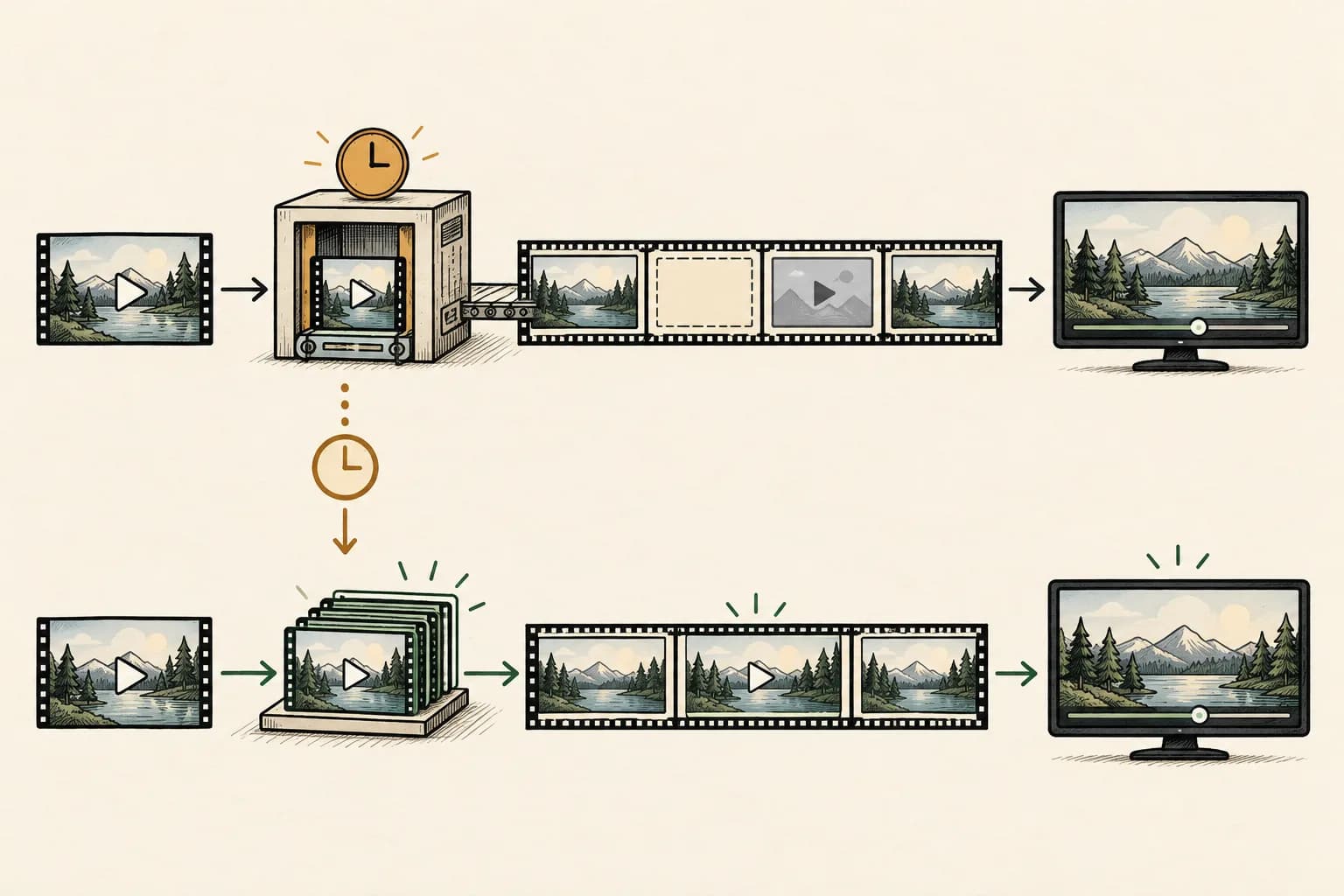
If an ad appears on a later playback but misses the first, check preparation readiness before changing the player timeout or blaming demand. An ad returned by the decision server is not necessarily ready to enter the stream. Establish which creative and content variants were involved, what preparation completed, and what the personalized manifest actually contained.
AWS's current MediaTailor insertion workflow says an ad not yet transcoded to match the content is skipped for the current request while MediaConvert prepares it for a later request. That describes a preparation branch, not a rule that every first viewing of every title must lack ads.
An older public VOD question describes this problem with a static VMAP test. Its author used dummy playback for a demonstration but questioned whether that would scale. The useful current answer is to verify the preparation path and choose a supported workflow, rather than turn synthetic production playback into an acceptance strategy.
Separate selection, preparation, insertion and playback#
Draw four checkpoints for one affected ad opportunity:
- The ad decision server returned a candidate creative.
- MediaTailor had suitable prepared media available.
- The personalized manifest included the intended ad.
- The player played it and the agreed measurement path reported the event.
A response at the first checkpoint does not establish the next three. A source MP4 opening in a browser proves something about that file and browser; it does not prove the insertion service has a matching prepared asset. Likewise, a completed preparation job is not a received impression.
Record the playback configuration, content asset or live output, session reference, ad-break reference, selected creative, source reference and timestamps. Keep the origin manifest and the relevant personalized result. Remove personal data and signed credentials from any packet shared outside the authorized investigation. Once readiness is established, verify the MediaTailor client-tracking retrieval and beacon handoff separately. A playable manifest does not establish that the client implements the tracking contract.
When the content-manifest request is rejected, investigate the origin and CloudFront authorization path separately from creative preparation. A manifest 401 and an unfinished ad transcode require different diagnostics.
If the media already reaches the player and fails to load, use the VAST error and timeout diagnostic. If the publisher has not accepted the serving arrangement or required renditions, use the CTV creative-trafficking checklist. This guide addresses the readiness handoff between those stages.
If the media already reaches the player and fails to load, use the VAST error and timeout diagnostic. If the publisher has not accepted the serving arrangement or required renditions, use the CTV creative-trafficking checklist. This guide addresses the readiness handoff between those stages. If ads play but editorial content is missing afterward, compare the replacement interval and intended programme continuation as a separate timeline-acceptance task.
Trace creative readiness before playback
Record preparation status, creative variants and the personalized manifest.
Use the tracking QA checklistOpens a practical guide. No email required.
First question: is the gap actually a readiness gap?#
Start with an affected session, not a campaign-wide fill percentage. Confirm that the relevant ad break existed, that an ad decision occurred, and that the candidate was omitted before the player could request its prepared media.
AWS's ad-skipping troubleshooting overview points to CloudWatch interaction logs and the skipped-ad records associated with FILLED_AVAIL. Inspect every relevant skipped-ad entry, not just the first array item shown in an example query. An avail can contain several candidates with different outcomes.
Preserve the actual schema from the log stream you queried. Similar documentation examples can use differently named fields. Validate a query against a known record before interpreting an empty result as proof that no ads were skipped.
Ask whether logging covered the affected interval and configuration. If the needed trace is unavailable, record that limitation and arrange a controlled observation. Do not retroactively assign the same cause to all missing ads because one session exposed a preparation problem.
Read the preparation status as a sequence#
The MediaTailor transcode-log reference distinguishes initialization, work in progress, completion and errors. Keep these states separate:
| Evidence | What it supports | Next check |
|---|---|---|
INITIALIZED | A transcode or preconditioned-ad import job was initialized | Find its subsequent status |
TRANSCODE_IN_PROGRESS | The prepared video is not ready | Correlate the later result with the affected request |
TRANSCODE_COMPLETED | The transcode completed and can support insertion | Verify the appropriate later manifest and playback |
TRANSCODE_ERROR, IMPORT_ERROR or missing-variant/profile errors | A specific preparation failure | Investigate that job or configuration, rather than just waiting |
A series ending at initialization is incomplete evidence. A failure is different from an ordinary first request arriving before preparation finishes. Retain the event timestamp, configuration and available creative, profile and request references so another reviewer can follow the same sequence.
Do not promise a fixed number of seconds until readiness. Measure the actual test and check the final status. A successful earlier job for another stream variant is not necessarily the prepared asset this request needs.
Why can the same-looking ad keep becoming new?#
AWS's NEW_CREATIVE troubleshooting guide identifies creative ID, AWS account and transcode variant set as relevant to preparation reuse. Changed creative identifiers or content rendition sets can require new work. It recommends consistent IDs for the same content and checking stream bitrates and variants.
Build a comparison between an affected request and a successful one. Record the identifiers actually returned, the selected media reference and the content's encoding ladder. Do not rely on the creative's display name or a screenshot of the source asset.
Then ask two separate questions: did the underlying creative change, and did the required output change? A new bitrate ladder, differently prepared VOD asset or changed serving configuration needs its own check even when the visible advertisement looks identical.
Keep identity accurate. Stabilizing an accidentally changing identifier for the same asset is different from reusing an old ID for changed content merely to avoid preparation. Do not conceal asset-version changes to make a readiness metric look better.
If identities and variants appear unchanged but the pattern persists, preserve the evidence and involve AWS Support. Avoid inventing a cache-expiry explanation without evidence of that condition.
Choose the preparation approach for the actual insertion method#
| Approach | Appropriate question | Evidence still required |
|---|---|---|
| Dynamic preparation | Can this workflow accommodate new assets being prepared when encountered? | Job completion, matching output and later insertion |
| Preconditioned assets | Can the operator prepare and maintain matching streaming renditions before selection? | Correct manifests, configuration, compatibility and released playback |
| Supported live prefetch | Can ads be retrieved and prepared ahead of an upcoming live break? | Applicable insertion method, schedule behavior and consumption result |
These are different arrangements, not interchangeable switches. Choose with the streaming operator and ad-serving owner. A smaller source file, larger player timeout or extra request does not by itself establish a complete preparation strategy.
Preconditioned assets need a compatibility contract
AWS documents preconditioned ads as externally transcoded assets supplied through the ADS. Its requirements include matching content variants, publicly accessible streaming .m3u8 or .mpd media, a parent ad manifest, and same-directory child manifests using relative paths. Compatibility becomes the operator's responsibility.
The documented setting is None for Streaming media file conditioning. It allows qualifying streaming media to be stitched without transcoding, but progressive-media fallback can still be transcoded. Therefore, “we already encoded the ad” does not establish that the selected VAST media takes the intended path.
Check the actual response, chosen manifest and effective configuration together. Validate the output against the intended content and representative player. Treat a successful upload as an intermediate step, not readiness proof. Use the linked requirements as the current implementation checklist rather than copying a sample without its constraints.
Live prefetch has a narrower scope than a universal warm-up fix
AWS's schedule-based prefetch documentation describes preparing ads ahead of live-stream breaks and excludes SGAI methods, including HLS Interstitials, from that mechanism. Separately, its guided-prefetch documentation supports manifest-heartbeat prefetch for live SGAI, not DASH. This is a different mechanism: player manifest refreshes must reach MediaTailor, so caching those i-media manifests defeats the heartbeat. Prefetching does not itself fire playback beacons.
Check the exact insertion method before selecting either path. Do not apply the schedule API to guided sessions or present either feature as a universal answer to the older VOD question.
For a supported live workflow, test which session and break the schedule covers, whether retrieval actually occurred before the deadline, and which ads were later consumed. A saved schedule is configuration evidence; it does not prove preparation or insertion happened.
Keep authorization and targeting requirements intact. An operational test should not create billable-looking production exposure, pollute campaign reporting or simulate completion beacons to make a demonstration appear successful.
Run a controlled cold-versus-prepared acceptance test#
Use an authorized test configuration and known assets. Do not clear shared production state to manufacture a cold test. Record what is known about preparation before starting, including when that state is uncertain.
| Test branch | Keep constant | Evidence to retain |
|---|---|---|
| Newly introduced test creative | Content variants and insertion configuration | Initial decision, preparation status, manifest and observed outcome |
| Same creative after confirmed preparation | Relevant identity and content variants | Later decision and actual inclusion/playback |
| Required content variant changes | Creative asset where appropriate | Whether new preparation is needed for that output |
| Preconditioned-path test | Supported manifest and matching content | Selected streaming media, effective conditioning and compatibility result |
| Readiness passes but measurement is absent | Successful insertion and playback trace | Sender responsibility, emitted event and receiver record |
Change one variable per branch. If the ADS selects a different creative on the repeat, that is not a controlled comparison of the same prepared asset. If the player seeks past the break, that is a different playback condition. Annotate both rather than quietly counting the retry as a pass.
Keep the complete test history. A later successful playback confirms that tested path; it does not establish that every new creative and rendition is prepared before its first eligible opportunity.
A hypothetical readiness review with explicit denominators#
Hypothetical example only: an operator reconciles 20 distinct test candidate opportunities from its own correlated records. It assigns each one exactly one initial terminal review status:
| Review status | Opportunities |
|---|---|
| Intended ad included and playback observed | 12 |
| New creative awaiting preparation | 4 |
| Existing preparation still in progress | 2 |
| ADS timeout | 1 |
| Variant mismatch requiring investigation | 1 |
| Total reviewed | 20 |
Twelve of twenty, or 60%, have observed playback in this test. Six of twenty, or 30%, have a readiness hold. These are results from an invented, mutually exclusive review classification. They are not a formula for adding CloudWatch counters or dividing unrelated service metrics.
The operator follows the six readiness holds to their final preparation status and tests again with the required controls. It retains the timeout and variant investigation separately. It does not report that 40% of campaign impressions were fraudulent or that resolving six holds recovered a corresponding amount of spend.
If repeated requests refer to the same opportunity, deduplicate them before applying this worksheet. If correlation is uncertain, keep an unresolved category rather than forcing the figures to reconcile.
Monitor the gap without confusing it with impressions#
The official CloudWatch metric reference defines AdNotReady, SkippedReason.NewCreative and SkippedReason.TranscodeInProgress as preparation-related observations. They are not unique viewers or independently verified impressions. It also distinguishes planned fill from observed reporting; server-side impression-beacon counts do not establish ultimate delivery to the recipient.
Use those signals to choose the interval and configuration for deeper investigation. Keep units and dimensions compatible. Do not sum readiness series as mutually exclusive failures unless a documented event-level mapping supports that calculation.
After insertion is established, review tracking separately. The SSAI measurement guide explains why the sender's actions and the measurement recipient's records need separate evidence. Successful media preparation cannot repair a missing tracking handoff on its own.
Close the investigation with an actionable packet#
Provide the affected interval and timezone, playback configuration, sanitized content and creative references, actual decision response, preparation timeline, relevant manifests, representative playback result and measurement scope. State the smallest unresolved question: identity reuse, variant compatibility, unfinished job, insertion or tracking.
For supported campaigns sending relevant events to AdProof, prepare a campaign/date/timezone-scoped export of the available delivery and video-stage records. Use it alongside the operator's preparation trace, not as a substitute for MediaTailor job logs or playback evidence. The anonymized streaming-publisher case provides campaign-review context. Request an AdProof measurement review to establish which received events are available for this comparison.
Frequently asked questions#
Does NEW_CREATIVE mean every first viewing must miss an ad?
No. Investigate the specific candidate and preparation state. The first viewing of a title and the first encounter with an unprepared creative/output combination are different conditions.
Should I repeatedly play production videos until ads appear?
Use an authorized acceptance plan with isolated test traffic and preserved evidence. Repeated playback is not a substitute for choosing a supported preparation workflow or validating the resulting configuration.
Does turning conditioning off mean any uploaded file can be inserted?
No. Validate the selected media and documented preconditioned requirements. A configuration value cannot make an incompatible asset, manifest or output ladder suitable for the stream.
If transcoding completed, why is the impression still missing?
Trace the later manifest, actual playback, measurement sender and recipient in order. Job completion establishes one readiness checkpoint; it does not establish every subsequent event or its final reporting treatment.
Trace creative readiness before playback
Record preparation status, creative variants and the personalized manifest.
Use the tracking QA checklistOpens a practical guide. No email required.