
- Published
- Nov 1, 2026
- Reading time
- 11 min read
MediaTailor 401 Errors: Trace CloudFront and Origin Access
Diagnose MediaTailor manifest 401 errors by tracing the rejecting request hop, CloudFront behavior and supported origin authentication before changing access.
In this guide (9 sections)
When MediaTailor reports a manifest 401 while a player shows a 504, start with the rejected request between services. Identify the URL, request time and component that produced the 401. Then check the authorization contract for that specific hop. Changing a browser CORS setting or accepting any request with a familiar User-Agent does not establish that MediaTailor can securely retrieve the content manifest.
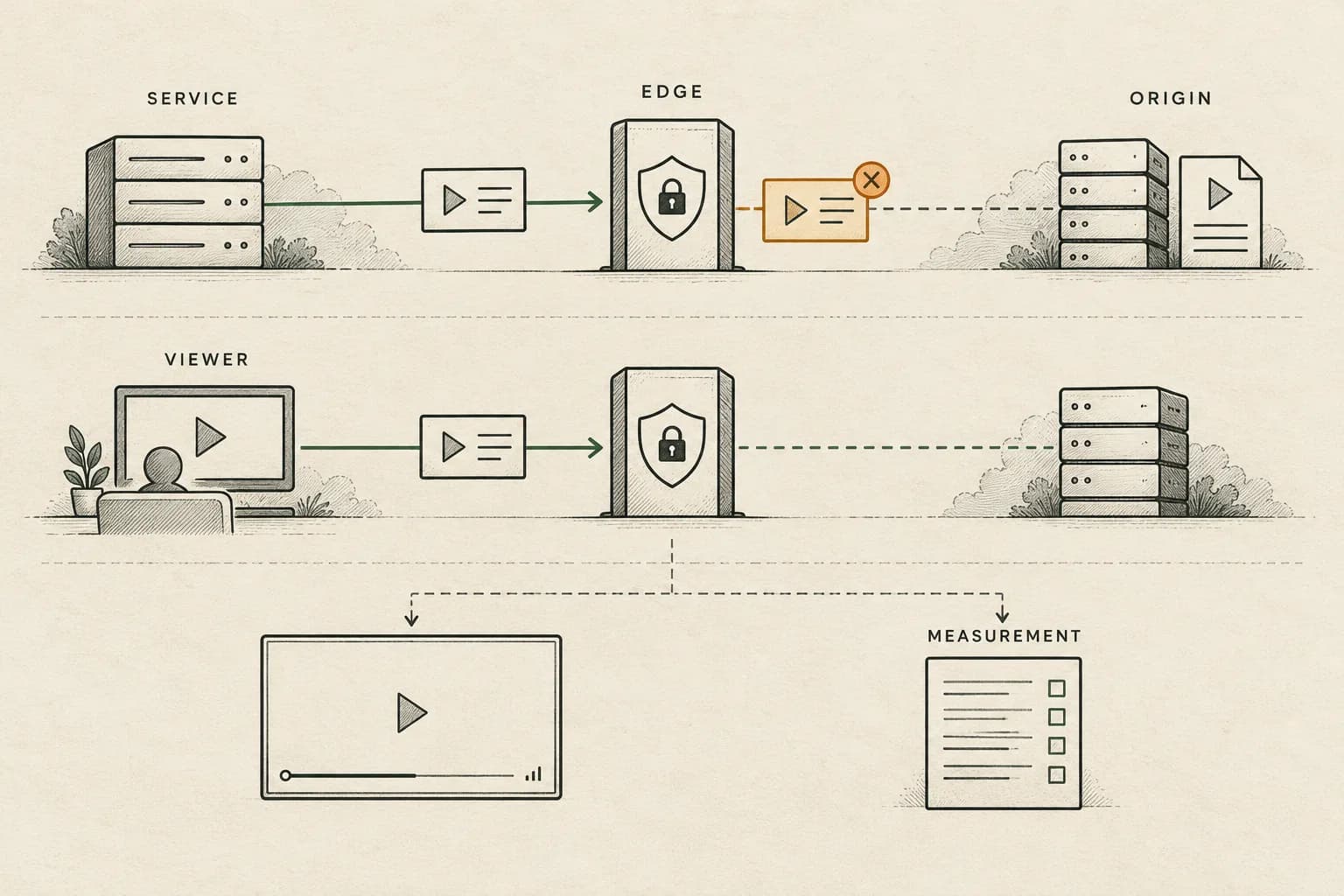
Keep three investigations separate: content-origin retrieval, delivery to the viewer, and ad measurement. A successful manifest response is a useful checkpoint. It does not establish that an ad was selected, played or measured.
The real problem: staging plays, production rejects the manifest#
An older AWS re:Post question describes MediaTailor playback failing after a CloudFront Function is attached. The poster reports a browser 504, a MediaTailor MANIFEST_ERROR with an underlying 401, and a function-generated CloudFront response. Their function examines Origin and User-Agent headers. They ask how to admit the service's requests while keeping viewer access controlled.
The original is now accessible through the public web reader. Its relative age is older evergreen; the precise creation date and complete latest activity were not independently captured. The generated answer on that page is not evidence that its suggested header exception correctly authenticates this deployment.
This guide uses current AWS documentation checked on 1 November 2026. It provides an evidence sequence, rather than diagnosing that account or prescribing one CloudFront function for every origin arrangement.
Trace the request that returns the 401
A player’s 504 may follow a rejected manifest request at another service boundary. Discuss the request and authorization evidence available.
Discuss measurement optionsA short inquiry to scope relevant options; no campaign access is needed.
1. Draw the requests that actually cross an access boundary#
A playback workflow contains several requests that may use different callers, paths and credentials. Start with the failing configuration and draw its actual route, including any CDN in front of the content origin.
| Request | Caller and destination to identify | Evidence to retain |
|---|---|---|
| Session or personalized manifest request | Viewer/player through the configured delivery route | Requested host, path, response and session context |
| Content manifest retrieval | MediaTailor toward its configured content source | Origin base URL, response status and matching service-side error |
| Content segment retrieval | The client/CDN route referenced by the manifest | Resolved child URL and selected cache behavior |
| Ad segment retrieval | The route referenced for the inserted ad asset | Ad-segment URL, response and preparation context |
| Tracking request | The configured sender toward the tracking recipient | Event, sender, timing and receiver evidence |
AWS's CDN integration guide distinguishes routing behaviors from MediaTailor's CDN mapping. One decides how incoming paths are routed; the other influences the locations referenced in returned manifests. Editing one does not prove the other is correct.
Place each access control on this drawing. A viewer-facing authorization rule and a service-to-origin authorization rule have different callers to validate. Determine which rule the failing request encountered before deciding what credential or configuration it needed.
2. Find the response producer, not only the visible status#
Preserve the relevant MediaTailor error and the corresponding CDN record for the same interval. A player-level error describes what the player experienced; the nested service error may identify an earlier failure. Do not combine unrelated requests merely because both occurred within the same minute.
Record the request method, host, path, status, time zone, chosen route and deployed function version where available. Use existing authorized logs. Preserve sensitive request material privately and redact credentials and personal fields before sharing an investigation packet.
AWS's CloudFront and MediaTailor monitoring guide identifies useful fields including status, request path, User-Agent and edge result type. These provide context; a field's presence does not prove that the caller was authenticated.
A response generated at the edge deserves a different investigation from a rejection returned by the origin. The CloudFront Functions tutorial demonstrates a function returning its own response, including a FunctionGeneratedResponse marker. Check the actual response and function association in your deployment. The marker does not explain why your function chose to reject the request.
If the evidence stops at a generic 401, retain that uncertainty. Obtain the component's request or decision record before changing another service's settings. If logging was unavailable for the incident, reproduce a bounded authorized test and record the limitation rather than reconstructing missing facts.
3. Review the selected behavior and function association#
For the rejected path, identify the behavior that actually matches it. Save its origin, path pattern, function association, forwarding rules and authorization requirements. Compare the deployed configuration with the staging version that worked.
An extension alone is a poor investigation boundary. A top-level manifest, a child playlist and a media segment can have different destinations. The same suffix appearing on two paths does not establish that the same rule should authorize both.
Use AWS's CDN troubleshooting sequence to organize the comparison: inventory the configuration, inspect logs, identify the affected workflow, and test the relevant boundary. Keep proposed changes small enough to explain which hypothesis they test.
For example, a controlled test that reaches the origin after correcting one mistaken behavior association strengthens a routing finding. It does not validate every token rule, device, content path or ad segment. Record the exact tested path and the configuration change together.
4. Separate forwarding information from authentication#
User-Agent, Origin and other request metadata can help explain why a rule behaved differently for a service and a browser. Their values are evidence to inspect. A string containing a service name is not, by itself, a cryptographic proof of that service's identity.
Avoid replacing the failing rule with a broad exception for every media extension or a substring in a header. Such a change can make a test request pass while changing which other requests are admitted. The appropriate fix must retain the intended access boundary and use an authentication mechanism supported by the actual caller and destination.
Header forwarding is a separate contract. The CDN integration guide describes headers used when forwarding player traffic to MediaTailor, including User-Agent and X-Forwarded-For for client context. That guidance concerns the CDN-to-MediaTailor direction. It is not a universal header allowlist for MediaTailor fetching a content origin.
Similarly, a browser console reporting CORS needs a browser-facing response investigation. It does not establish that a server-to-server 401 was caused by CORS. Resolve the demonstrated failure first, then test the viewer-facing response independently.
5. Check whether documented origin SigV4 applies#
AWS documents SigV4 authentication for MediaTailor requests to supported origins. The supported-origin requirements cover MediaTailor Channel Assembly, Amazon S3 and MediaPackage version 2, with HTTPS, specified origin URL forms, service access and relevant resource permissions.
Read the requirements for the origin you actually configured. Confirm its endpoint form and applicable origin policy. A service principal appearing in a policy is only one part of that check; scope the permitted resource and the source account or playback configuration as documented for the arrangement.
This documentation does not establish a universal signing solution for an arbitrary CloudFront hostname or custom origin. If an intermediary changes the route, do not assume that placing the supported service behind it preserves the same authentication behavior. Obtain the documented contract for that route or take the bounded evidence to AWS support.
Keep viewer access in view as well. AWS's CDN security guidance discusses viewer authentication and origin restrictions as separate controls. A repair should demonstrate the intended service path and preserve rejection of unauthorized viewer or direct-origin requests within the tested design.
A hypothetical triage ledger: 120 requests are not 120 lost impressions#
Suppose an investigation selects 120 content-manifest retrieval attempts for one playback configuration and a defined ten-minute interval. These are requests; retries may belong to the same session. Each attempt is placed in exactly one evidence category.
| Classified result | Attempts | What is established |
|---|---|---|
| Edge-generated 401 with matching function evidence | 72 | A bounded function-decision investigation |
| Origin-returned 401; credential decision still unresolved | 18 | An origin authorization investigation |
| Timeout without a usable origin response | 12 | A separate transport investigation |
| Manifest response received successfully | 18 | Manifest retrieval succeeded for those attempts |
| Total | 120 | The selected request population |
The edge-generated category is 72 / 120 = 60% of attempts. It is not a fraud rate, lost-revenue estimate or percentage of viewers who missed an ad. The remaining categories require their own evidence; do not label all 102 unsuccessful attempts as one function defect.
Of the 18 successful manifest responses, suppose the team inspects the referenced child requests for 12 and has not examined the other six. All 12 inspected sets are accessible in that test. Record 12 checked and six unknown. Do not present the unexamined six as segment failures, or the successful 12 as confirmed ad impressions.
This ledger makes work assignable without converting request counts into commercial outcomes. The function owner investigates the 72 classified attempts; the origin owner investigates the 18 rejections; the transport owner investigates the 12 timeouts. Each receives its own reproducible evidence packet.
6. Accept the repair through the delivery chain#
Write the acceptance sequence before changing configuration. Use an approved test environment and supported test content or ad traffic. AWS's function tutorial specifically keeps its example association on a testing distribution or behavior.
A useful sequence checks:
- The intended service-to-origin request is admitted through the documented route.
- The returned manifest contains the expected content and ad locations for that test.
- The corresponding child requests succeed through their intended behaviors.
- The target player retrieves and plays the expected content and ad sequence.
- The configured event sender dispatches the expected measurement signals.
- The receiving system records the scoped events under the agreed counting policy.
- Unauthorized test requests remain rejected according to the intended access design.
Keep the configuration version, test time, selected paths and observations together. Compare the same authorized attempt before and after a correction where practical. A different device, asset or playback configuration is an additional test, not a replacement for the original failing case.
For preparation failures after manifest access is restored, use the MediaTailor first-play readiness guide. For tracking metadata retrieval and event dispatch, use the client-tracking and polling guide. The SSAI verification guide explains why server-originated delivery evidence needs its own interpretation.
The anonymized streaming-publisher case illustrates bounded delivery reconciliation. It does not establish a CloudFront authentication outcome. For campaigns measured through AdProof, request a scoped review with the available event export, configuration timeline and report boundaries. Keep origin/CDN diagnostics alongside that evidence; AdProof's received-event records do not prove that an unobserved upstream request succeeded.
Frequently asked questions#
Does a player 504 mean MediaTailor itself rejected the request?
The status alone does not locate the rejection. Follow the matching request through the player, CDN, service and origin evidence. An underlying 401 needs its own response-producer and authorization investigation.
Can I authorize MediaTailor by matching its name in User-Agent?
A matching string alone does not establish caller identity. Verify the authentication mechanism supported by the actual service-to-origin route. Preserve viewer and origin restrictions while testing the correction.
Does origin SigV4 work with every CloudFront domain?
The referenced MediaTailor guide specifies supported origins and their endpoint, HTTPS and permission requirements. It does not establish a universal solution for an arbitrary CloudFront hostname or custom intermediary.
Does a successful manifest request count as an ad impression?
It establishes manifest retrieval for that request. Ad selection, child-asset delivery, playback and measurement receipt need their own evidence. Keep those populations separate when reconciling a delivery report.
Trace the request that returns the 401
A player’s 504 may follow a rejected manifest request at another service boundary. Discuss the request and authorization evidence available.
Discuss measurement optionsA short inquiry to scope relevant options; no campaign access is needed.